
Draftbit vs Replit: You can't publish to Google Play from Replit.
From Draftbit, you can publish the same app to the App Store, Google Play, and the web, and build it on the Claude or ChatGPT subscription you already pay for. Replit's docs say "Publishing to Google Play is not yet supported by Replit", and the stronger modes of its agent are billed by effort from Replit credits, so if your customers carry Android phones, that's the difference that decides it.
By Brian Luerssen, Founder of Draftbit. Facts checked . Published by Draftbit, one of the two products compared.
Which should you choose?
Choose Draftbit if
- Your customers use Android phones, so the app has to be in Google Play.
- You already pay for Claude or ChatGPT and would rather build on that than on credits billed by effort.
- You want to pick the agent, Claude Code or Codex, and the model on each thread.
- You want to choose your database, or move a backend we set up into your own Supabase account later.
Choose Replit if
- The web and the App Store are enough for now. Replit's Launch feature covers the iOS build, signing, and upload.
- What you're building isn't only an app. In Replit you can also make data visualizations, slide decks, and animated videos, and run bots and scheduled jobs.
- You want a database, file storage, sign-in, and hosting included and run for you in one place.
- A developer will pull changes back in from Git. Replit's Git tools push and pull. In Draftbit that needs an app connected to a repository you already have, because GitHub export goes one way.
Draftbit vs Replit at a glance
With both tools an agent writes a React Native and Expo app from your description, so these rows are about where that app can be published, what the agent's work costs, and what you can take with you.
| What's compared | Draftbit | Replit |
|---|---|---|
| What you can build and publish | ||
| Google Play | Built, signed, and uploaded to Google Play from the Publish menu, on Standard and up. | Not yet. Its docs say "Publishing to Google Play is not yet supported by Replit." You can build and preview the Android version. Source : Replit on google play |
| App Store | Built, signed, and uploaded to App Store Connect from the same menu, on Standard and up. | Yes. Its Launch feature "creates that build, signs it, and uploads it from the Publishing tab". Source : Replit on app store |
| Beyond apps | Mobile apps, web apps, websites, games, and backends in one project. Backends are written in TypeScript. | Its Core plan lists "Web apps, mobile apps, data visualizations, slide decks, animated videos, and more". Source : Replit on beyond apps |
| The AI | ||
| What you build on | Your own Claude or ChatGPT subscription or API key on every plan, Free included, or Draftbit credits. | Replit credits. Its paid modes "use effort-based pricing based on request complexity", and a Free Mode with its own allowance doesn't use them. Source : Replit on what you build on |
| Agent and model | Claude Code or Codex, with a model picker on each thread. | On Core and Pro you "can choose an available model in Power Mode or Max Mode". In Free Mode, the model is selected for you. Source : Replit on agent and model |
| The backend | ||
| Where it runs | An API backend in your project on Cloudflare D1, Supabase, or your own Postgres, or a Supabase backend we set up for you, which can move into your own Supabase account. | "A server that runs on Replit in the cloud" handles the database, API routes, and backend logic. Its code leaves by ZIP or Git. Source : Replit on where it runs |
| Working on the app | ||
| Editing by hand | Visual editor on every plan. Code editing on Standard and up. | A Visual Editor on every plan, the free Starter plan included. Source : Replit on editing by hand |
| Git | One-way GitHub export to a branch you choose, on Standard and up. An app connected to your own repository saves to your branch, and Sync brings in commits made outside. | Push and pull with a connected Git provider, and ZIP download from the file tree. Source : Replit on git |
| Simulators | iOS and Android simulators in the browser, on Pro and up. | "iOS Simulator and Android Emulator previews are available to builders on Core, Pro, and Enterprise plans." Source : Replit on simulators |
Replit
- Describe the app
- React Native and Expo app
- Web
- App Store
- Google Play (not available)
Draftbit
- Describe the app
- React Native and Expo app
- Web
- App Store
- Google Play
Where your app can be published
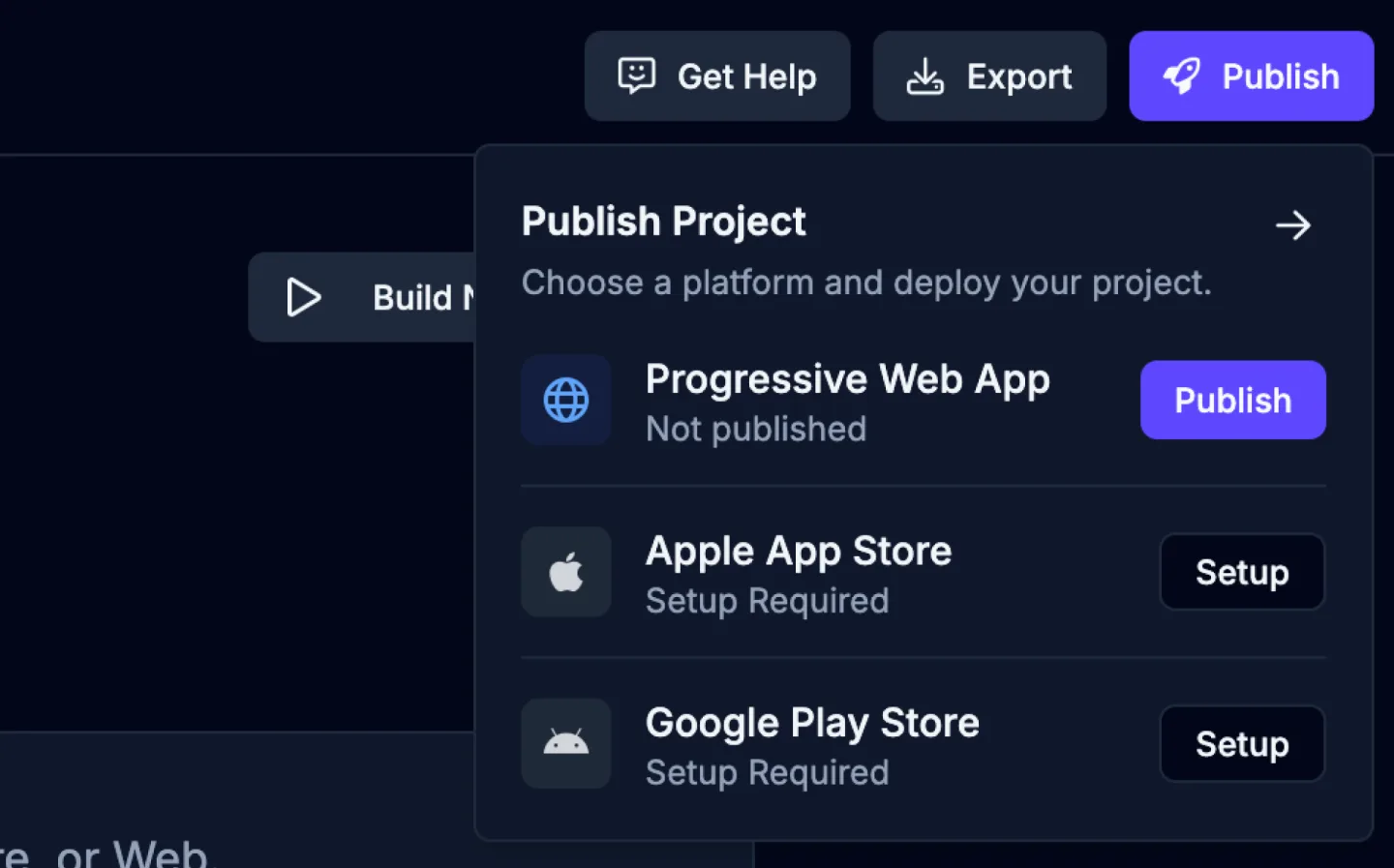
If your customers use Android phones, this is what decides it, because you can publish to Google Play from Draftbit and you can’t from Replit yet.
Mobile apps in both tools are React Native and Expo, so one codebase covers iOS and Android, and in Replit you can build and preview the Android version. The App Store side is covered. Replit’s docs describe a Launch feature that “creates that build, signs it, and uploads it from the Publishing tab”. For Android, though, the same docs say, “Publishing to Google Play is not yet supported by Replit.”
In Draftbit, the web, the App Store, and Google Play are in the same Publish menu. Once you’ve entered your Apple and Google developer account details, the app is built, signed, and uploaded to App Store Connect and Google Play, on Standard and up. Apple and Google still review it and decide when it goes live.
What the agent’s work costs
With Replit, the agent’s stronger modes are billed by effort from Replit credits, and in Draftbit you can build on the Claude or ChatGPT subscription you already pay for.
Replit’s agent has three modes. Free Mode doesn’t use credits, and on Core and Pro it comes with an allowance that refreshes every five hours, with the model selected for you. Power Mode and Max Mode are where you choose a model, and they “use effort-based pricing based on request complexity”, so a harder request takes more of your monthly credits. We couldn’t find a way on Replit’s site to run the agent on your own subscription or API key.
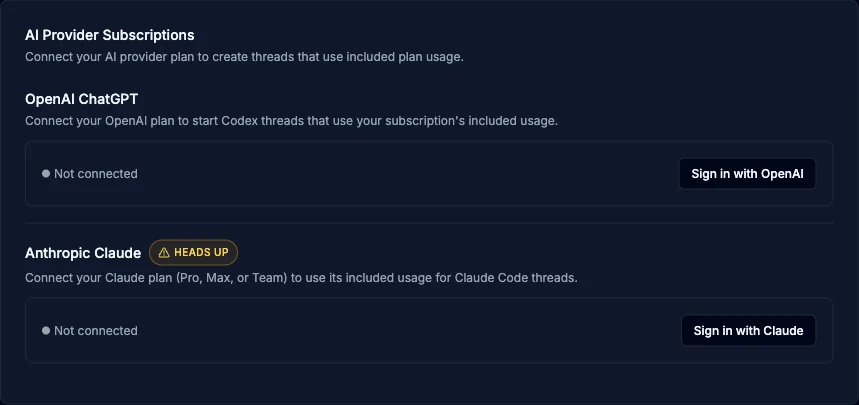
In Draftbit, you can sign in with your ChatGPT or Claude subscription or add your own API key on every plan, Free included, and a thread that runs on it doesn’t use Draftbit credits however hard the request is. Your provider’s usage limits still apply. We sell credits too, for anyone who’d rather not connect an account.
Where Replit does more
If what you’re building is bigger than an app, Replit covers more ground than we do.
Its Core plan lists “Web apps, mobile apps, data visualizations, slide decks, animated videos, and more”, and its deployment types include always-on servers for bots and commands that run on a schedule. Every app comes with a database, with file storage and sign-in available too. There’s a Visual Editor on every plan, so editing by hand isn’t something only we offer, and simulators start on Core where ours come with Pro.
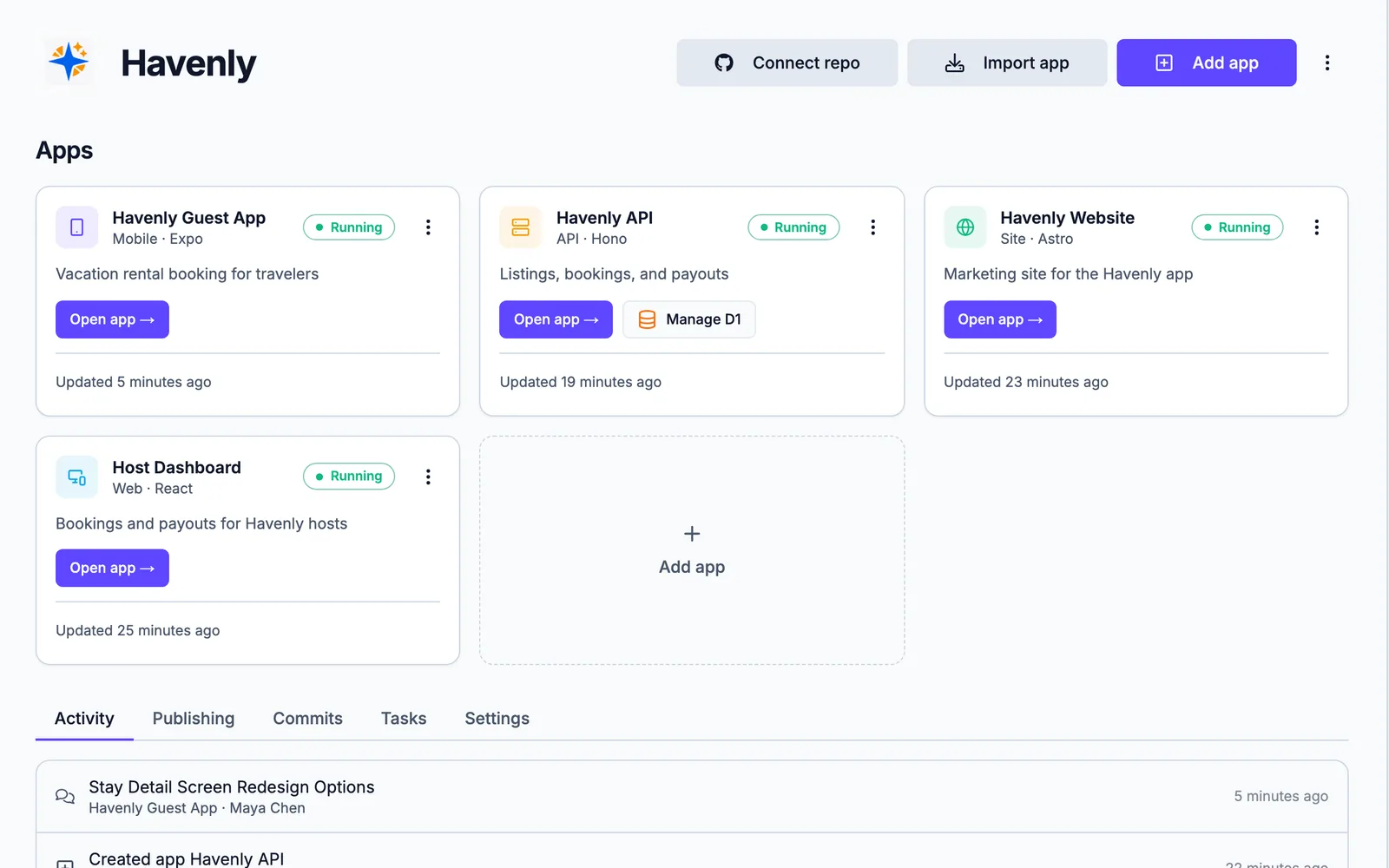
A Draftbit project holds mobile apps, web apps, websites, games, and backends, and those backends are written in TypeScript. If yours has to be in Python or PHP, you can connect to it from Draftbit, but you can’t build it there.
What you take with you
You own the code in both tools, so the difference is where the backend runs once the code has left.
Replit’s docs say, “You own the code Agent generates and you’re responsible for it.” You can download it as a zip or push and pull with a Git provider. Our GitHub export goes one way, and pulling changes back in needs an app connected to a repository you already have. The server behind a mobile app “runs on Replit in the cloud”, and running Replit-built apps in your own cloud is an early-access option for enterprise customers. In Draftbit, the backend’s code exports like any other app in the project on Standard and up, and a Supabase backend we set up can be moved into your own Supabase account, though its staging and production environments need a paid plan and use credits while they run.
What you'll pay
Draftbit Standard
$15/month; or $144/year ($12/month equivalent)
Base subscription with code editing, ZIP and GitHub export, custom domains, and iOS/Android publishing. AI usage is separate.
Replit Core
$20/month, or $18/month billed annually
$20 of credits a month toward its paid modes, Free Mode with an allowance that refreshes every five hours, Full build, unlimited published apps, and 5 collaboration seats.
If you already pay for Claude or ChatGPT, that subscription does the building in Draftbit, so Standard stays at $15 a month. If you'd rather not connect a subscription, you can add Draftbit credits to the plan, from $5 a month for 5,000. Replit Core is $20 a month. Its Free Mode has an allowance that refreshes every five hours, and its Power and Max modes are billed by effort from $20 of monthly credits, with pay-as-you-go billing after that, so what you spend depends on how much of your building goes to the paid modes and what the published app uses.
Prices are in US dollars and were checked on November 23, 2026. See every Draftbit plan and Replit's current pricing.
What other sites get wrong about Draftbit
Many comparisons on other sites describe an older Draftbit. Here's what they say, and what's true today.
- Claim Draftbit is a drag-and-drop builder.
- Fact Claude Code and Codex build the app from what you describe. The visual editor is for the changes you'd rather make by hand, and it edits the same code. Read more
- Claim Draftbit has no backend.
- Fact A project can hold an API backend with its own database, or a Supabase backend we set up for you and you can move into your own account. Read more
- Claim You have to buy AI credits.
- Fact You can build on your own Claude or ChatGPT subscription, or your own API key, on every plan, Free included. We sell credits too, for anyone who'd rather buy them from us. Read more
- Claim Draftbit only makes mobile apps.
- Fact It builds mobile apps, web apps, websites, games, and backends, and one project can hold all of them. Read more
What's new at Replit. In August 2026, Replit added Free Mode, where you can build without using Power Mode or Max Mode credits. We read its changelog through November 20, 2026, and found no entry for Google Play publishing.
Switching from Replit
If you've built a mobile app in Replit and you need it in Google Play, that's the move we think is worth making. Mobile apps in Replit are React Native and Expo projects, and you can import Expo apps into Draftbit from GitHub or a zip file, so download the project or push it to a Git provider and bring the app across. If the Expo app sits in a folder beside its server, point the import at that folder.
You don't have to move everything at once. Replit's docs describe a mobile app as a client on the phone and a server that runs on Replit, so the imported app can keep calling that server while you decide what to do with it. We couldn't find a statement on Replit's site about what happens to published apps when a paid plan is cancelled, and its free plan includes one published app for 30 days, so check that before you cancel a plan the app still depends on.
When you're ready to move the backend, the agent can build an API backend in the same Draftbit project, and you choose the database. Replit's production database comes with a connection string, so its data can be copied to wherever it lives next.
When you import, you choose between having an agent migrate the app to Draftbit's conventions, which gets you the full builder and the visual editor, and importing it with minimal changes into a simpler builder. The choice is permanent for that project, and the import copies your code once without staying linked to the original, so finish or pause your work in Replit first.
What Draftbit can import and how Draftbit Experts can do the move for you.
In customers' words
“Using Draftbit NEXT alongside ChatGPT made the whole process feel collaborative rather than overwhelming, and together they helped me turn an idea into something real and genuinely cool.”
“The visual builder let me focus on features and UX, while the clean code export meant I wasn’t locked in.”
Test it yourself
Don't take our word for it. Try these in both tools before you decide. Draftbit's Free plan is enough to run them.
- Build the same small app in both tools, then open each one's publishing screen and check which stores you can send it to.
- Ask each agent for the same three changes, and note what each one used: credits in Replit, and either Draftbit credits or your own Claude or ChatGPT plan in Draftbit.
- Change one small thing by hand in each tool's visual editor, such as a label or a margin, and decide which one you'd rather use every day.
Frequently asked questions
Can Replit publish to Google Play?
Not yet. Replit's docs say "Publishing to Google Play is not yet supported by Replit." You can build and preview the Android version there, and the App Store has a built-in flow. In Draftbit, Android apps are built, signed, and uploaded to Google Play from the Publish menu on Standard and up.
Can Replit publish to the App Store?
Yes. With Replit's Launch feature, the iOS build is created, signed, and uploaded to App Store Connect for TestFlight, once you've enrolled in the Apple Developer Program and published the app's backend. You finish the listing and submit it for review in App Store Connect, as you would after publishing from Draftbit.
Can I use my own Claude or ChatGPT subscription with Replit?
We couldn't find a way to run Replit's agent on your own subscription or API key. Its docs describe bringing your own key for AI features inside the app you're building. In Draftbit, you can connect a Claude or ChatGPT subscription, or your own API key, on every plan, and threads that run on it don't use Draftbit credits.
Do Draftbit's paid plans include AI credits?
No. Standard is $15 a month and that doesn't include credits, because you can build on your own Claude or ChatGPT subscription, or your own API key, on every plan. If you'd rather use Draftbit credits, you can add them to any paid plan, from $5 a month for 5,000.
Is Draftbit cheaper than Replit?
It depends on how you build. Draftbit Standard is $15 a month if you bring your own Claude or ChatGPT subscription, and Replit Core is $20 a month, or $18 a month billed annually, with $20 of credits. Replit's Free Mode has an allowance that doesn't use those credits, and its paid modes are billed by effort, so the comparison comes down to how much of your work would go to the paid modes.
Can I move a Replit app into Draftbit?
Yes, for the mobile app. Mobile apps in Replit are React Native and Expo projects, and you can import Expo apps into Draftbit from GitHub or a zip file. The server and database that run on Replit don't come with it, so the imported app can keep calling them, or you can have the agent build a new backend in your Draftbit project.
Do I own the code in both?
Yes. Replit's docs say "You own the code Agent generates and you're responsible for it", and you can download it as a zip or push it to a Git provider. In Draftbit the code is yours too, with ZIP and GitHub export on Standard and up.
Sources
We publish Draftbit, so we have a stake in this comparison. Every fact about Replit comes from its own site and docs, checked on November 23, 2026.
- Replit native mobile apps, including Google Play and simulators
- Replit App Store upload
- Replit mobile app guide
- Replit pricing
- Replit Starter plan
- Replit Core plan
- Replit Pro plan
- Replit AI billing
- Replit Free Mode
- Replit model selector
- Replit AI Integrations, including your own key inside an app
- Replit deployment types
- Replit database
- Replit storage and databases
- Replit sign-in options
- Replit Bring Your Own Cloud
- Replit Git tools
- Replit on code ownership
- Replit projects and files, including ZIP download
- Replit changelog
Related comparisons
-
Draftbit vs Bolt
With Bolt, publishing a mobile app starts with "download the code".
-
Draftbit vs Lovable
With Lovable, your app stops at the browser.
-
Draftbit vs a0
The code is the same in a0 and Draftbit. The difference is what else you get.
You can't publish to Google Play from Replit.
If your app needs to reach Android phones as well as iPhones, build it on the Free plan with the Claude or ChatGPT plan you already pay for, and move to Standard when it's ready for both stores.