
Best AI app builders for mobile: choose by output and control
Compare AI app builders for native mobile, shared Expo code, and web apps. See pricing references, code ownership, and which workflow fits your team.
Last updated
Start with the app you’re trying to finish
If you’ve tried a few AI builders and still aren’t sure which one can finish your app, start with where your customers will use it. Bolt, Replit, and a0.dev support React Native or Expo mobile work. Rork uses Swift and Kotlin for new mobile apps. Lovable focuses on the web, while GlideOS brings business data and workflows together.
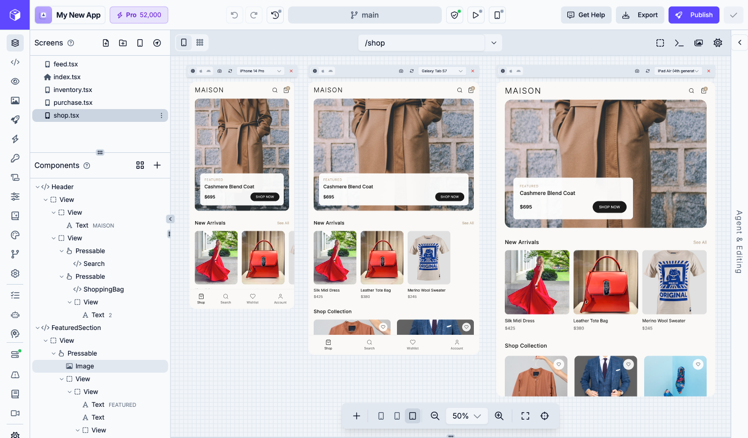
We use React Native and Expo too: tools for building iOS and Android apps from shared source files. In Draftbit, you can adjust supported components visually while an agent works on the same project. If you’d rather make a layout change yourself than ask for another generated version, that’s the difference to test.
An impressive web prototype can still be the wrong starting point for a feature that needs native device support. Pick the type of app first, then compare how you’ll edit it, what you can export, and what it costs to keep working.
We publish Draftbit, so we have a stake in this comparison. We selected tools with documented AI app creation and different approaches to output, editing, and ownership. The official documentation and pricing were reviewed on November 23, 2026. We haven’t run a controlled benchmark or ranked performance; each comparison links to the sources behind our recommendations.
| Builder | Consider it when | Example paid plan |
|---|---|---|
| Draftbit | You want your own AI subscription or key, one connected project for the app, web app, and backend, the newest Claude and OpenAI models with full visual control, and one-click publishing with code you keep. | Draftbit Standard: $15/month; or $144/year ($12/month equivalent). AI usage is separate. |
| Bolt | You're building for the web and want hosting, a domain, and a database included, or you're comfortable running Expo's command-line tools to release a mobile app. | Bolt Pro: $25/month, or $216/year. Starts at 10 million tokens a month with no daily limit, and unused tokens roll over for up to two months. Adds custom domains and a choice of database provider, and removes Bolt branding. Larger token tiers cost more. |
| Replit | You're building more than an app, such as data visualizations, bots, or scheduled jobs, in one workspace, and the web and the App Store are the only places it needs to ship. | Replit Core: $20/month, or $18/month billed annually. $20 of credits a month toward its paid modes, Free Mode with an allowance that refreshes every five hours, Full build, unlimited published apps, and 5 collaboration seats. |
| a0 | You're building an iPhone app, and you want the App Store upload, push notifications, and over-the-air updates built in. | a0 Pro: $20/month. 100 credits a month, unlimited app builds, code export, and a custom domain without a0 branding. |
| Rork | You want true Swift and Kotlin apps, or you're building for Apple Watch, Vision Pro, or widgets, and you're fine keeping two codebases in step. | Rork Max, 100 credits: $20/month. 100 credits a month with Build mode for iPhone, Android, and the web, plus iPad, Apple Watch, Vision Pro, iOS widgets, and code editing. Simulator minutes and AI features in your apps use the same credits. |
| Lovable | You're building for the web only, and you'd like hosting, a database, and sign-in run for you in one place. | Lovable Pro, 100 credits: $25/month, or $250/year. 100 credits a month and 5 more each day, with code editing, code download, and custom domains. Running the backend and in-app AI uses credits too, after a small monthly grant. |
| Glide | Your team needs an internal tool on its own data this week, with the hosting, permissions, and workflows run for you. | GlideOS Basic: $25/month. 100 credits, 2 team members, 2 published apps for personal and team use, and 1 enabled workflow. |
We reviewed these competitor plans on November 23, 2026. The paid tiers shown include different features, so their prices alone won't tell you the total cost of building your app. Each comparison covers free plans, features that need a higher tier, annual billing, and usage charges. Our base prices come from our current plan definitions.
- Draftbit vs Bolt: Bolt official pricing
- Draftbit vs Replit: Replit official pricing
- Draftbit vs a0: a0 official pricing
- Draftbit vs Rork: Rork official pricing
- Draftbit vs Lovable: Lovable official pricing
- Draftbit vs Glide: Glide official pricing
Draftbit: visual controls in a code project
You can let an agent work on the app while you adjust supported components visually. Both kinds of changes stay in your source files. Our Mobile projects use React Native and Expo. If you choose a Web or Website project instead, you’ll use a different framework and won’t get a native mobile app.
Already paying for a supported Claude or ChatGPT subscription? You can use it for eligible agent work here, or use our credits or a supported provider key. Provider limits still apply, and paid Draftbit features require the relevant plan: Standard for ZIP export, GitHub export, and code editing. The AI options FAQ and current plans explain those limits.
We’d look at another tool if you need Swift or Kotlin code, want a general coding workspace, or prefer a business-app platform that manages more of the services behind the app.
Bolt: browser development with Expo
Bolt documents Expo development and device builds, so it supports mobile as well as web projects. Its GitHub integration lets you work from the repository outside the builder.
Consider it if you want AI generation in a browser coding environment and are comfortable managing files and build steps. Choose a mobile project at the start and test native dependencies in a device build. When budgeting, use Bolt’s token allowances; a token isn’t equivalent to another builder’s credit. The Draftbit vs Bolt comparison covers plans and migration.
Replit: mobile alongside other development work
Replit’s mobile workflow uses Expo and includes device testing and App Store publishing tools, though its docs say publishing to Google Play isn’t supported yet. Its broader environment can suit teams that also build services or other types of software.
If you plan to use Replit’s hosting too, budget for the services behind the app as well as the code you edit. Check how you’d maintain the exported project and what your plan includes for agent work and deployment. The Replit comparison explains how that setup differs from Draftbit’s visual editing workflow.
a0.dev: prompting and previewing a mobile app
a0.dev may suit you if you want to build a React Native mobile app through a focused prompt-and-preview workflow. Its docs distinguish web preview, companion-app testing, and native builds.
Use a device build to check permissions, native packages, and store behavior; a browser preview gives you less evidence about those features. Confirm source export and build allowances on your intended paid plan. The a0.dev comparison includes pricing sources and migration notes.
Rork: Swift and Kotlin clients
Rork’s current documentation says new Expo projects are no longer available. New iPhone apps use Swift and Android apps use Kotlin. Existing Expo projects remain supported. That changes the architecture your team will maintain.
Consider Rork when you want platform-specific native code and can maintain the resulting clients. Its Free plan covers Design mode; building a working app requires a paid plan. See the Rork comparison for pricing on Rork Max, which has replaced Rork Pro for new buyers, and the differences between new projects and legacy Expo apps.
Lovable and GlideOS: web and business apps
Lovable makes sense for an app used primarily on the web. Its FAQ covers web output and PWA or wrapper options for mobile distribution. It doesn’t claim to generate a React Native client. A wrapper packages a web app for phones. It may be enough for your app, so try the device features you need before deciding you need a different framework.
GlideOS is built for business software organized around data. It supports external AI agents, an option it shares with Draftbit. GlideOS and Glide Classic have separate plans and capabilities. Check the Lovable and Glide comparisons for the product-specific details.
Try the same difficult task in each builder
Give the tools on your shortlist the same small brief: a screen, a useful interaction, and a difficult integration or device feature. Track the work needed to fix generated behavior. Check what source you can obtain and what plan covers the complete workflow.
Include an error state as well as a successful action, and test data access with different user roles. Use a device build for native features. These checks can help you choose; our comparison itself is based on the published sources above.
For a move prompted by source ownership, start with the alternatives page. If you’ve already chosen the framework, use the React Native and Expo shortlist. The no-code shortlist covers visual logic for teams that don’t want to maintain code.
Try it with your own app
Start with the requirement you’re least sure about. You can build a small version in our free visual editor, then check the result and the plan you’ll need before taking on the whole app.