
Best React Native and Expo app builders: four workflows to compare
Compare Draftbit, Bolt, Replit, and a0.dev for React Native and Expo development, visual editing, code ownership, device testing, and publishing.
Last updated
You know the framework. Now choose how you’ll work.
If you’ve settled on React Native and Expo, you’ve narrowed the field. These tools let you build iOS and Android apps from shared source files, but the builders around them offer different ways to work. Bolt puts prompts and files in the browser. Replit combines mobile development with a broader workspace and hosting. a0.dev focuses on prompting, previewing, and building mobile apps.
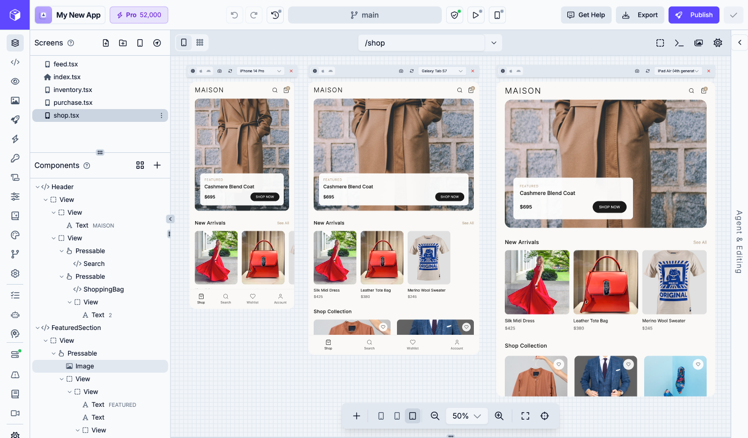
Our approach pairs that source project with visual component controls. If you want to select a component and change its properties while an AI agent works on the app, try that workflow in Draftbit. Whichever builder you choose, check how you’ll get the source, test on a device, and publish updates.
We publish Draftbit, so we have a stake in this comparison. We reviewed official documentation on November 23, 2026, selecting tools with a documented React Native or Expo workflow. Builders that use another framework for new projects are outside this shortlist. We haven’t benchmarked performance or shipped the same app through all 4 services.
| Builder | Consider it when | Example paid plan |
|---|---|---|
| Draftbit | You want your own AI subscription or key, one connected project for the app, web app, and backend, the newest Claude and OpenAI models with full visual control, and one-click publishing with code you keep. | Draftbit Standard: $15/month; or $144/year ($12/month equivalent). AI usage is separate. |
| Bolt | You're building for the web and want hosting, a domain, and a database included, or you're comfortable running Expo's command-line tools to release a mobile app. | Bolt Pro: $25/month, or $216/year. Starts at 10 million tokens a month with no daily limit, and unused tokens roll over for up to two months. Adds custom domains and a choice of database provider, and removes Bolt branding. Larger token tiers cost more. |
| Replit | You're building more than an app, such as data visualizations, bots, or scheduled jobs, in one workspace, and the web and the App Store are the only places it needs to ship. | Replit Core: $20/month, or $18/month billed annually. $20 of credits a month toward its paid modes, Free Mode with an allowance that refreshes every five hours, Full build, unlimited published apps, and 5 collaboration seats. |
| a0 | You're building an iPhone app, and you want the App Store upload, push notifications, and over-the-air updates built in. | a0 Pro: $20/month. 100 credits a month, unlimited app builds, code export, and a custom domain without a0 branding. |
We reviewed these competitor plans on November 23, 2026. The paid tiers shown include different features, so their prices alone won't tell you the total cost of building your app. Each comparison covers free plans, features that need a higher tier, annual billing, and usage charges. Our base prices come from our current plan definitions.
- Draftbit vs Bolt: Bolt official pricing
- Draftbit vs Replit: Replit official pricing
- Draftbit vs a0: a0 official pricing
Draftbit: edit screens visually and work with the source
Our Mobile projects use React Native and Expo. A designer can adjust supported components visually while a developer or AI agent works on the same project’s code. You keep source files that you can continue working on outside the visual editor.
Standard includes code editing, ZIP export, and GitHub export. GitHub export is one-way and replaces the selected branch. It doesn’t continuously sync in both directions. Read the export FAQ and plan details before choosing how your team will collaborate.
If you’re bringing existing code, start with our import FAQ. It explains project requirements and import modes. Using React Native is only part of compatibility: navigation, styling, custom packages, and native configuration also affect what visual tools can edit.
If you already pay for a supported AI subscription, you can use it for eligible agent work with us. Your provider’s usage limits and our paid export requirements still apply. Other builders also offer agents, visual tools, or source access, so we’d compare how those parts work together on your app.
Bolt: work through prompts and files in the browser
Bolt’s Expo guide covers native mobile development. Consider it if you like iterating through prompts and files in a browser and are comfortable maintaining the resulting code.
Specify mobile at the start, then inspect the generated files before building many features. Previewing a web app on a phone doesn’t turn it into a React Native app.
Bolt’s GitHub integration supports work outside the builder. Check synchronization behavior if several people or tools will edit the repository. Take a project through to an installable build, including a native dependency your app needs. The Bolt comparison covers pricing and migration.
Replit: a mobile client and a broader workspace
Replit’s mobile documentation describes Expo development, device testing, and App Store publishing, though it says publishing to Google Play isn’t supported yet. Its general environment may suit a team that works on services and other application types alongside the mobile client.
Replit can run services your mobile app relies on. Exporting the app’s source won’t move a hosted API, login system, database, or scheduled task with it. Decide which services you want to keep there and how you’d move them if that changes.
Use Replit’s Git tools to check how a developer will maintain the app. Review agent and hosting allowances separately from the subscription price to estimate operating costs. The Replit comparison includes dated pricing.
a0.dev: concentrate on the mobile app
a0.dev combines React Native development with several preview and build options, and its advertised paid plans include source export. It may suit you if you want to focus on mobile without adopting a broader development workspace.
Its docs cover web preview, mobile app testing, and native build testing. Use the browser to make quick changes, then a native build to check the features that need a device.
Check whether your packages work in the preview environment and how you’ll test those that don’t. Inspect an exported project before handing it to a developer. See the a0.dev comparison for current plans and a migration checklist.
Where Rork, FlutterFlow, and Lovable differ
Rork still supports its existing Expo projects. Its current Expo documentation says new mobile projects use Swift or Kotlin, so we cover it in the broader AI app builder shortlist rather than recommend it for a new Expo app.
With FlutterFlow Studio, the visual builder, you can export Flutter/Dart code on paid plans, while the new AI builder that carries the FlutterFlow name has no code export. Lovable generates web apps and documents PWA and wrapper options for mobile. These tools may suit their intended uses, but their output isn’t interchangeable with React Native source. Read the FlutterFlow and Lovable comparisons if you’re considering those approaches.
Take a small project through the handoff
Create the smallest useful version of your app, inspect the source, and test a device feature. Make a change and build it again. Then check how a second developer would take over. That gives you a way to compare the handoff on your own project; our review uses the published sources above.
Keep a short handoff note with the framework and package versions, export options, required plan, and services the app relies on. Configure secrets for the destination environment instead of copying them into client code. Use non-production data to test authentication and permissions.
Test iOS and Android separately even with a shared codebase. Include permissions, navigation, keyboard behavior, and store-dependent features. Assign responsibility for package upgrades and release builds after launch.
If React Native is optional, the visual no-code shortlist gives you more choices. If you’re trying to reduce switching costs, the alternatives page separates source migration, backend migration, and a client rewrite.
Try the editing workflow
Build a small version of your most important screen in our free visual editor. Make a few changes yourself and with an agent, then decide whether that’s how you want to work on the rest of the app.