
Best no-code app builders for iOS and Android: a practical shortlist
Compare visual app builders for iOS and Android by logic, source export, pricing, and publishing. See which approach fits the way you want to work.
Last updated
You want to build an app without maintaining code
That’s a reasonable place to start. Adalo brings visual screens and data together, and Thunkable lets you see app logic as blocks. Bubble keeps the application and the services that run it on one platform. With FlutterFlow Studio, you build visually and get Flutter source files you can hand to developers.
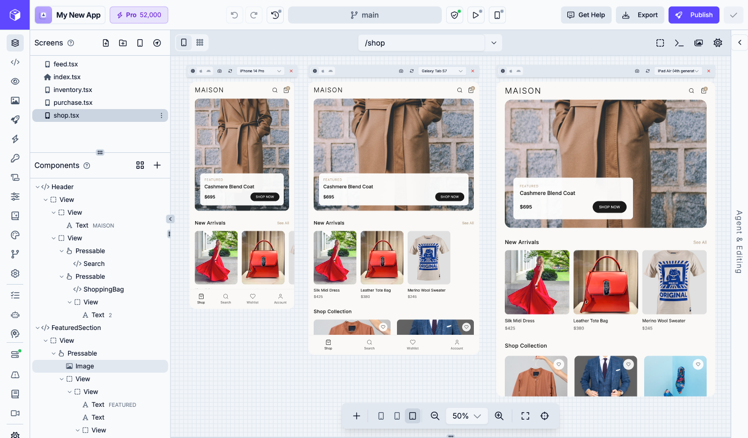
If you want visual controls but expect to need custom code later, we’d suggest trying our approach too. In Draftbit, those controls work on a React Native and Expo project, the source files for an iOS and Android app. That gives you more room to change it, along with more responsibility for maintaining it.
“No-code” describes how you work in the builder. It doesn’t settle what you can export, where the app runs, or whether an outside developer can take over. Those are the questions this comparison helps you answer.
We publish Draftbit, so we have a stake in this comparison. We reviewed official documentation on November 23, 2026, selecting visual builders with documented mobile workflows and including our own approach to visual editing with source access. We haven’t run a hands-on benchmark. The table lists researched plans; the cheapest tier may not include the publishing or export features you need.
| Builder | Consider it when | Example paid plan |
|---|---|---|
| Draftbit | You want your own AI subscription or key, one connected project for the app, web app, and backend, the newest Claude and OpenAI models with full visual control, and one-click publishing with code you keep. | Draftbit Standard: $15/month; or $144/year ($12/month equivalent). AI usage is separate. |
| Adalo | You'd rather not learn anything technical, and you want a hosted database with every project and one flat monthly price. | Adalo Builder: $65/month, or $624/year. AI building each month with no prompt limit, 2 published apps, publishing to the stores and the web, custom domains, 5 app editors, and a sample of Ada's code. The first month is $30 on monthly billing. |
| Thunkable | You're learning or teaching how apps work, or you'd like to see your logic as blocks and keep your data in a Supabase account that's already yours. | Thunkable Accelerator: $19/month, billed monthly. 20,000 AI tokens a month, 5 public projects, 1 private project, and 10 screens per project. |
| FlutterFlow | Your team wants Flutter and Dart, and FlutterFlow Studio's visual builder on your own Firebase or Supabase project. | FlutterFlow Basic: $39/month, or $351/year. AI usage for a simple app, with no refills. In Studio, unlimited projects, code download, the CLI, one-click store deployment, and 1 custom domain, for 1 editor. |
| Bubble | You like building logic visually, you want one hosted backend for web and mobile, and you expect to stay on Bubble. | Bubble Starter, web and mobile: $69/month, or $59/month billed annually. 1,000 AI credits and 175,000 workload units a month, a live website with a custom domain, 5 mobile build submissions a month, and 3 live app versions. Web only is $39 a month, and mobile only is $49. |
We reviewed these competitor plans on November 23, 2026. The paid tiers shown include different features, so their prices alone won't tell you the total cost of building your app. Each comparison covers free plans, features that need a higher tier, annual billing, and usage charges. Our base prices come from our current plan definitions.
- Draftbit vs Adalo: Adalo official pricing
- Draftbit vs Thunkable: Thunkable official pricing
- Draftbit vs FlutterFlow: FlutterFlow official pricing
- Draftbit vs Bubble: Bubble official pricing
Adalo: build and maintain the app visually
Adalo can suit a small team that wants to assemble screens, connect data, and publish without maintaining a source repository. Its publishing documentation explains distribution, and its plans set the limits.
We’d start with the part you’re least sure Adalo can handle: a relationship between records, a permission rule, or a tricky interaction. An app built around saving and updating records needs different things from one with unusual device behavior. A small test can tell you whether its components and data model cover yours.
If editable-code export is a requirement, read Adalo’s post on the new Adalo, which says source code is available as a separate service that’s priced on its own and isn’t part of the plans. Settle the handoff question before choosing the platform: data ownership alone doesn’t give you a client that a developer can maintain independently. The Adalo comparison covers pricing and migration work.
Thunkable: see the logic in blocks
Thunkable’s documentation describes screens, components, and logic blocks. You can see each operation in the blocks, which can help when you’re learning how the app works.
Try a complete flow with input validation, navigation, a data request, and a failure state. Check that the required device components exist and work in a native build. A browser preview won’t answer every mobile question.
The pricing conditions explain what happens to private projects and published apps when subscriptions expire, including exceptions for legacy plans. Read the rules for your plan. We couldn’t confirm editable source export in the docs, so ask Thunkable about the files a developer would need. The Thunkable comparison explains what we could verify.
FlutterFlow: take Flutter source to developers
FlutterFlow is now two products, and a project can’t move between them. FlutterFlow Studio is the visual builder, where you work toward a maintained Flutter/Dart codebase, while the new AI builder that carries the FlutterFlow name has no code export. Studio’s plan comparison separates code download from GitHub integration and other tools on higher tiers.
Source export helps with a developer handoff, but those developers will need Flutter expertise. Moving a Flutter client into a React Native builder requires a rewrite.
Test what happens to custom code and externally edited files after a visual change. FlutterFlow Studio’s external coding-agent workflows give you options beyond visual editing. The FlutterFlow comparison explains source export and synchronization so you can choose a workable editing process.
Bubble: keep logic on a managed platform
Bubble suits teams that want visual application logic and a managed platform. Review its native-mobile tools alongside its web features; older descriptions of Bubble as web-only miss part of the current product.
Its application and data ownership documentation explains an important limit: owning the data doesn’t let you export the application as independently runnable source. Bubble’s manual now also describes leaving through its MCP server, which is in beta: you have an AI agent read the app and recreate it in code, and the manual says the process gives you “a strong starting point, not a finished app.” Your plans need to account for Bubble’s runtime and workload-based pricing.
Prices vary with the product you select. Our comparison quotes the Web & Mobile bundle and labels it accordingly. Check the product, workload, and publishing allowances you need before using that figure in a budget.
Draftbit: visual editing with room for code
Our visual controls edit a React Native and Expo source project. When a change needs code, an AI agent or developer can work on those same files. You can pay for agent work with our credits or supported external AI credentials.
Someone still needs to review the generated behavior, dependencies, permissions, and store builds. A more managed visual platform may suit a team that wants to avoid code maintenance altogether.
Standard includes code editing, ZIP export, and GitHub export. Our prices in the table come from the same plan definitions as the rest of the site. Check pricing for the features in each tier and the cost of AI usage.
Check which Glide product you mean
Glide Classic is a familiar visual business-app builder. Glide also offers GlideOS, which has separate subscriptions and uses an agent workflow. The table doesn’t use GlideOS prices for Classic. If shared business data and managed workflows are your priority, read the Glide comparison.
Check the handoff before committing
Ask each vendor how you’ll obtain the app customers install or open, the data you can retrieve, and the editable project a future team will maintain. Check which paid plan each requires. An app-store package and a source repository serve different purposes.
Test your hardest flow with realistic non-production data. Include more than one user role, a failed network request, and any native device feature you need. Identify which work you can do in the builder and which parts need an external service or developer.
The alternatives page helps if source ownership drives the decision. For prompting instead of visual blocks, compare the AI app builders. If React Native is required, use the Expo shortlist to exclude other stacks.
Try a screen before choosing a plan
You can use our free visual editor to build a small version of the part that matters most. See whether you like making changes this way, then check the plan you’ll need for the full app.