
Draftbit vs Adalo: An Adalo app runs on Adalo, and the code costs extra.
A Draftbit app is code you own, backend included, with export part of every paid plan, and it's built by Claude Code and Codex on the Claude or ChatGPT subscription you already pay for. With Adalo, the app and its database run on Adalo, and its site says code export "isn't part of the plans: it's a separate service, priced on its own", so the question to settle first is whether you'll ever want the code in your own hands.
By Brian Luerssen, Founder of Draftbit. Facts checked . Published by Draftbit, one of the two products compared.
Which should you choose?
Choose Draftbit if
- You want the app's code in your own hands, with export included in the plan and not priced separately.
- You want a backend you can read, change, and take with you, on a database you choose.
- You already pay for Claude or ChatGPT and would rather build on that than buy AI credits.
- A developer may take over later, and they'll expect an ordinary React Native and Expo project.
Choose Adalo if
- You don't want to learn anything technical, and you're happy never seeing the code.
- You want a hosted database that comes with every project, with nothing to choose or set up.
- You'd rather pay one flat monthly fee, with no charges for each action or each seat.
- Several people will edit the app. Adalo's Builder plan includes 5 app editors, and our Standard plan includes 1, with more at $10 a month each.
Draftbit vs Adalo at a glance
With both tools you describe an app and get one for iOS, Android, and the web without writing code yourself, so these rows are about where that app runs, who holds its code, and what you build it on.
| What's compared | Draftbit | Adalo |
|---|---|---|
| The code | ||
| Export | ZIP and GitHub export on Standard and up, as an ordinary React Native and Expo project. | Not in any plan. Its site says code export is "a separate service, priced on its own", which you request from its team. Source : Adalo on export |
| Editing | Visual editor on every plan. Code editing on Standard and up. | By asking Ada or editing visually. Its site says you change the app "never in code". Source : Adalo on editing |
| Seeing the code | A selected component's code on Free, and the full code editor on Standard and up. | A sample of Ada's code on Builder, and all of it on Business. Source : Adalo on seeing the code |
| The backend | ||
| Where it runs | An API backend in your project on Cloudflare D1, Supabase, or your own Postgres, or a Supabase backend we set up for you. | A hosted Postgres database on Adalo that comes with every project, with nothing to set up. Source : Adalo on where it runs |
| Changing the database | The agent writes each schema change as a migration saved with your code, which you can read and edit on Standard and up. | In apps built with Ada, schema changes "are handled through Ada rather than directly in the Database panel". Source : Adalo on changing the database |
| Taking it with you | The backend's code exports like any other app in the project, and a Supabase backend we set up can be moved into your own Supabase account. | Its help docs describe a CSV download, one collection at a time. We couldn't find a way to run the backend elsewhere. Source : Adalo on taking it with you |
| The AI | ||
| What you build on | Your own Claude or ChatGPT subscription or API key on every plan, Free included, or Draftbit credits. | Ada, with AI building included in each plan and extra AI credits to buy. We couldn't find a way to bring your own AI. Source : Adalo on what you build on |
| Publishing and price | ||
| App Store and Google Play | Built, signed, and uploaded to App Store Connect and Google Play from the Publish menu, on Standard and up. | Published to the App Store and Google Play from Adalo, on Builder and up. Source : Adalo on app store and google play |
| Team seats | Standard includes 1 editor seat, and each one after that is $10 a month. | Builder includes 5 app editors, and its pricing page says there's "no per-seat pricing". Source : Adalo on team seats |
Adalo
- Describe the app
- App and database on Adalo
- Publish to the stores
- Request the code, priced separately (you do this yourself)
Draftbit
- Describe the app
- App and backend in your project
- Publish to the stores
- Export to ZIP or GitHub
Who holds the code
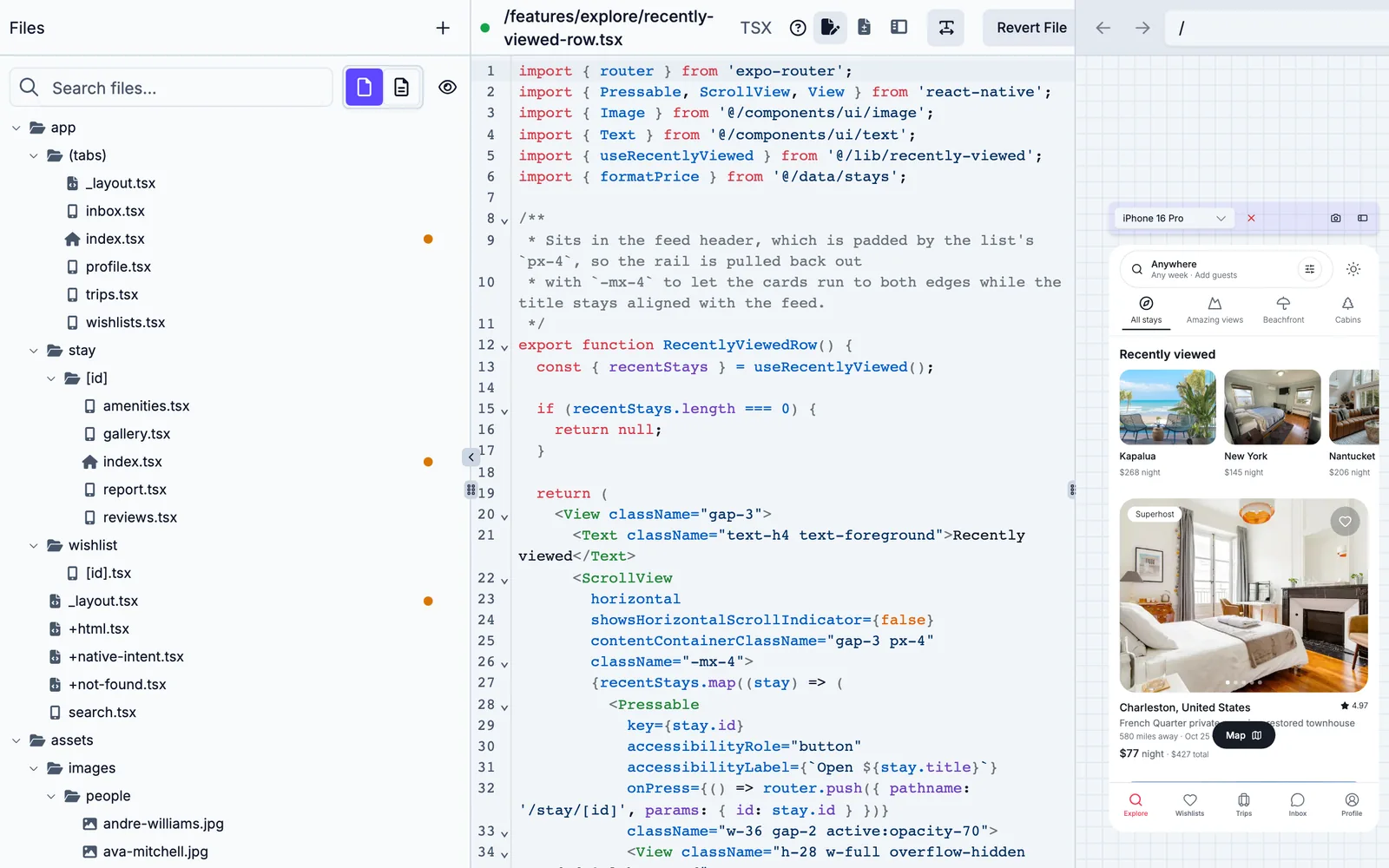
In Draftbit, the code comes with every paid plan, and with Adalo it’s a separate purchase that you ask for.
With the new Adalo you can get your app’s source code, but its site is plain that code export “isn’t part of the plans: it’s a separate service, priced on its own”, and we couldn’t find the price anywhere on the site. Day to day the code stays out of reach too, because in Adalo you change your app “by asking Ada or editing it directly, never in code”.
All of the code that Draftbit produces for mobile apps is React Native and Expo, and the agents and the visual editor change those same source files. On Standard and up you can edit them in the builder, download them as a ZIP, or export them to GitHub, so a developer who joins later gets an ordinary project. Our GitHub export only goes one way, though.
Where your data lives
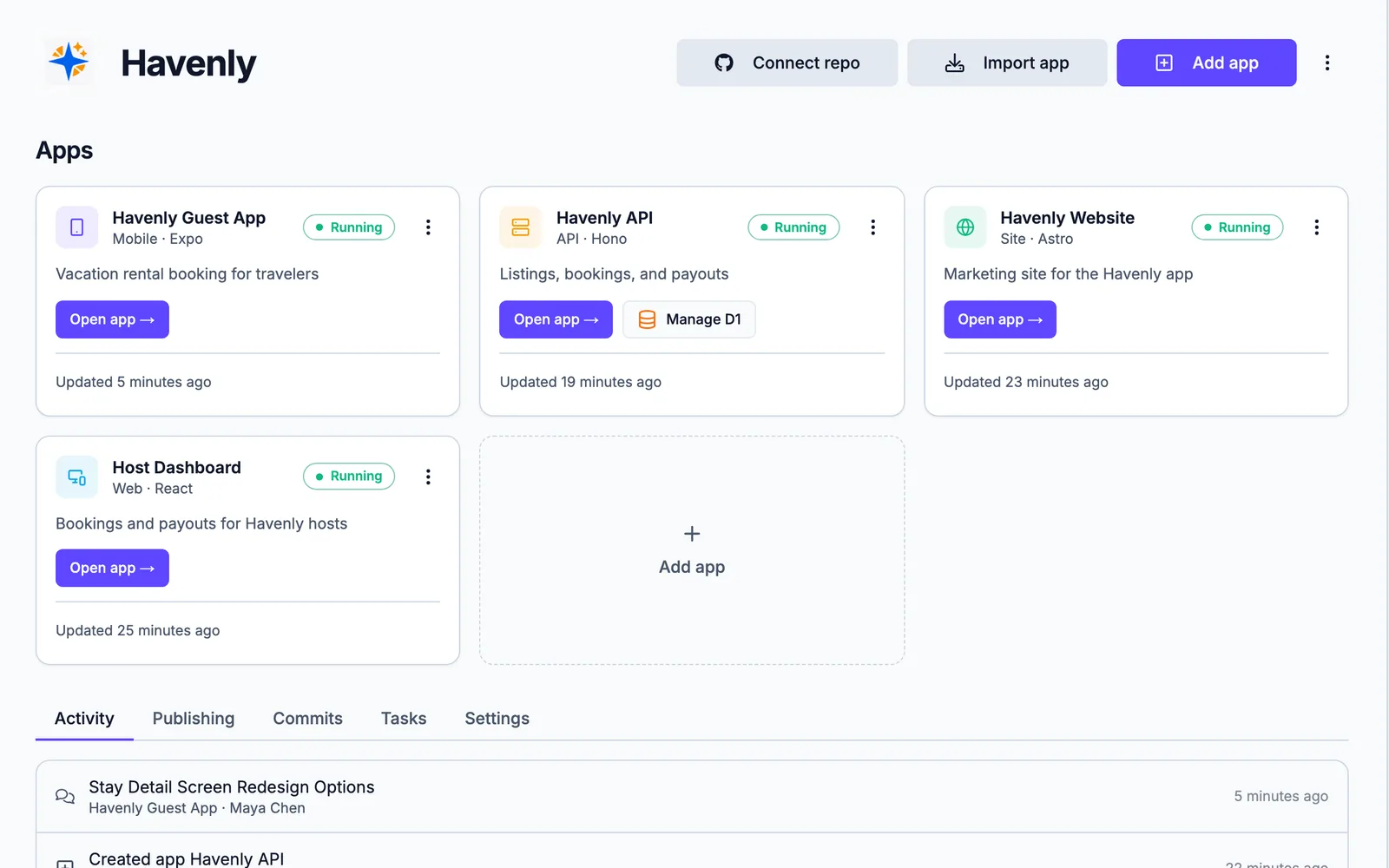
With Adalo, the database is hosted for you on Adalo, and in Draftbit the backend is code in your project on a database you choose.
Adalo’s side is the easier one to start with, because a hosted Postgres database comes with every project and there’s nothing to set up. It gets tighter when you want to change it yourself. In apps built with Ada, schema changes “are handled through Ada rather than directly in the Database panel”, and its help docs describe getting data out as a CSV file for one collection at a time.
In Draftbit, the backend is another app in your project, and you choose its database, which can be Cloudflare D1, Supabase, or a Postgres database you already run. Its code exports the same way as your other apps, and if you’d rather we set up Supabase for you, that project can be moved into your own Supabase account later. Staging and production for it do need a paid plan, and they use credits while they run.
What you build on
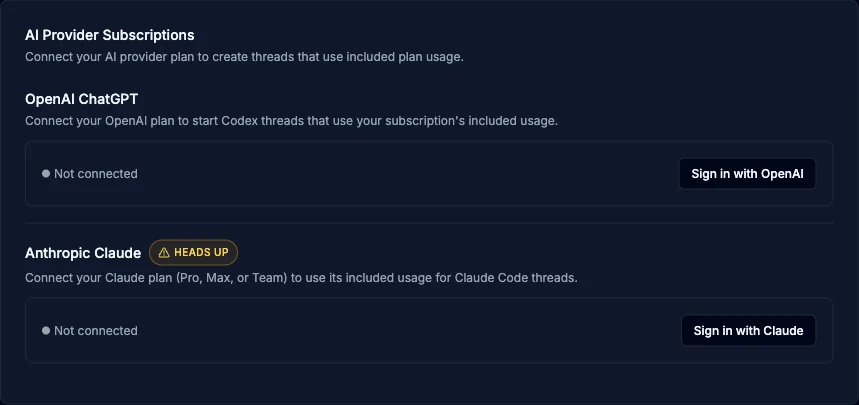
With Adalo you build with Ada on Adalo’s AI credits, and in Draftbit you can build on the Claude or ChatGPT subscription you already pay for.
Ada comes with every Adalo plan, along with some AI building each month, and if you need more, its pricing page says you can “buy extra AI credits any time”. We couldn’t find a way to bring your own AI to it.
In Draftbit, Claude Code and Codex do the building, and you pick the agent and the model on each thread. On every plan, Free included, you can sign in with your Claude or ChatGPT subscription or add your own API key, and threads that run on it don’t use Draftbit credits. Your provider’s usage limits still apply, and we still sell credits for anyone who’d rather not connect an account.
When Adalo is the better pick
If you don’t want to learn anything technical, Adalo asks less of you than we do.
Its site promises “No code to write and none to maintain”, with the hosting and the database run for you, for a flat monthly fee with “no per-action metering and no per-seat pricing”. So for an app you plan to keep on Adalo, that’s a fair trade.
Owning the code comes with some work, since somebody has to look after it once it’s yours, even if that’s the agent. You don’t need to read code to change things. With the visual editor, which is on every plan, you can select something in the preview and change it by hand.
What you'll pay
Draftbit Standard
$15/month; or $144/year ($12/month equivalent)
Base subscription with code editing, ZIP and GitHub export, custom domains, and iOS/Android publishing. AI usage is separate.
Adalo Builder
$65/month, or $624/year
AI building each month with no prompt limit, 2 published apps, publishing to the stores and the web, custom domains, 5 app editors, and a sample of Ada's code. The first month is $30 on monthly billing.
If you already pay for Claude or ChatGPT, that subscription does the building in Draftbit, so Standard stays at $15 a month, and code export is part of the plan. If you'd rather not connect a subscription, you can add Draftbit credits to the plan, from $5 a month for 5,000. Adalo Builder is $65 a month after a $30 first month, with AI building included, extra AI credits sold separately, and the code as a separate service that we couldn't find a price for. Adalo's fee covers its hosted database too, while a Supabase backend we set up uses Draftbit credits in staging and production, so add that to our side if you need one.
Prices are in US dollars and were checked on November 23, 2026. See every Draftbit plan and Adalo's current pricing.
What other sites get wrong about Draftbit
Many comparisons on other sites describe an older Draftbit. Here's what they say, and what's true today.
- Claim Draftbit is a drag-and-drop builder.
- Fact Claude Code and Codex build the app from what you describe. The visual editor is for the changes you'd rather make by hand, and it edits the same code. Read more
- Claim Draftbit has no backend.
- Fact A project can hold an API backend with its own database, or a Supabase backend we set up for you and you can move into your own account. Read more
- Claim You have to buy AI credits.
- Fact You can build on your own Claude or ChatGPT subscription, or your own API key, on every plan, Free included. We sell credits too, for anyone who'd rather buy them from us. Read more
- Claim Draftbit only makes mobile apps.
- Fact It builds mobile apps, web apps, websites, games, and backends, and one project can hold all of them. Read more
What's new at Adalo. Adalo now leads with Ada, an AI builder that makes the screens, database, and sign-in from your description, next to its Classic drag-and-drop builder, and its plans are now Free, Builder, and Business. Its post on the new Adalo, updated on October 21, 2026, says source code is available as a separately priced service, where an older help page still answers "Not currently".
Switching from Adalo
An Adalo app can't be imported into Draftbit as it is, so for most people moving means rebuilding, and the app you already have is the best brief you could write for it. Go through it one screen at a time and describe what each screen shows and does, and the agent builds the React Native version while you adjust the layout by hand in the visual editor.
Your data can come along. Adalo's help docs describe downloading each collection as a CSV file, one collection at a time and without a paid plan, so download them all before you start. We only found that described in its older help docs, so if your app was built with Ada, check that the download is there before you plan around it.
Then choose where the data lives next, which can be an API backend in your project or a Supabase backend we set up for you. Keep the Adalo app running until the new one is published, because publishing to the App Store and Google Play from Draftbit needs Standard, and Apple and Google still review the app before it goes live.
What Draftbit can import and how Draftbit Experts can do the move for you.
In customers' words
“The visual builder let me focus on features and UX, while the clean code export meant I wasn’t locked in.”
“Using Draftbit NEXT alongside ChatGPT made the whole process feel collaborative rather than overwhelming, and together they helped me turn an idea into something real and genuinely cool.”
Test it yourself
Don't take our word for it. Try these in both tools before you decide. Draftbit's Free plan is enough to run them.
- Build the screen you're least sure about in both tools, then change one small thing on it by hand, such as a label or a margin.
- Find out what it takes to get your code out of each: ask Adalo what its code export costs and what you'd receive, and check which Draftbit plan includes ZIP and GitHub export.
- Price a month of building in each: the plan, the AI you'd use once what's included runs out, and the seats your team needs.
Frequently asked questions
Can I export my Adalo app's code?
Adalo's site says yes for the new Adalo, as a separate service: "Code export isn't part of the plans: it's a separate service, priced on its own. Contact our team to request it." We couldn't find the price, what you'd receive, or whether apps made in the Classic builder qualify. An older Adalo help page still answers the same question with "Not currently", so ask before you count on it.
Who owns the code in each?
Adalo's help site says that under its terms you own the intellectual property of the app you make and can export its data at any time. Getting the source code itself is the separately priced service. In Draftbit the code is yours, and ZIP and GitHub export are part of Standard and every plan above it.
Is Draftbit cheaper than Adalo?
On the plan price, yes. Standard is $15 a month if you bring your own AI, or $15 plus a credit add-on that starts at $5 a month for 5,000 credits, and Adalo Builder is $65 a month after a $30 first month. The totals depend on what you add. Adalo's fee includes its hosted database and 5 app editors, while in Draftbit extra seats on Standard are $10 a month each, and a Supabase backend we set up uses credits in staging and production.
Can I move my Adalo app to Draftbit?
Probably not by importing it. What you can import into Draftbit is a JavaScript or TypeScript project from GitHub or a zip file, and we couldn't find what Adalo's exported code is written in. So if you've paid for Adalo's code export, check what you received before you plan a rebuild. If it can't be imported, describe each screen to the agent with your Adalo app as the reference, and bring the data over from Adalo's CSV downloads.
Do Draftbit's paid plans include AI credits?
No. Standard is $15 a month and that doesn't include credits, because you can build on your own Claude or ChatGPT subscription, or your own API key, on every plan. If you'd rather use Draftbit credits, you can add them to any paid plan, from $5 a month for 5,000.
Can I use my own Claude or ChatGPT subscription with Adalo?
We couldn't find a way to on Adalo's site. Building with Ada uses AI credits, with some included in each plan and more sold as add-ons. Its docs do describe adding an OpenAI key for AI features inside your app, which isn't the same as building with it. In Draftbit, you can connect a Claude or ChatGPT subscription, or your own API key, on every plan, and threads that run on it don't use Draftbit credits.
What happens to my Adalo app if I stop paying?
Adalo's publishing FAQ, on its older help site, says that after a downgrade to Free, published apps are no longer marked as published in the app stores or on a custom domain, and "all Actions will fail". In Draftbit, nothing is deleted when a paid plan ends, but export needs Standard, so take a copy of your code before it does.
Sources
We publish Draftbit, so we have a stake in this comparison. Every fact about Adalo comes from its own site and docs, checked on November 23, 2026.
- Adalo pricing, plans, and AI credits
- Adalo's post on the new Adalo, including code export
- Adalo's AI app builder: Ada, the database, and editing
- Adalo home page
- Adalo's docs for the Ada builder, including schema changes
- Adalo help: downloading a collection as a CSV file
- Adalo help: publishing questions, including downgrades
- Adalo help: general questions, including ownership
- Adalo help: what Adalo can do (older page)
- Adalo's docs on using an OpenAI key inside an app
Related comparisons
-
Draftbit vs Bubble
On Bubble, you own your data and Bubble owns the code.
-
Draftbit vs FlutterFlow
With FlutterFlow, you have to pick a product.
-
Draftbit vs Glide
A Glide app can't go in the App Store.
An Adalo app runs on Adalo, and the code costs extra.
Describe the app you have in mind, connect the Claude or ChatGPT plan you already pay for, and see how far you get on the Free plan. When you want the code, export is part of Standard.