
Product update
BYO Claude & ChatGPT, Supabase Backend, Theme and Typography Editing + more!
 Dave Sebek
Hey builders! It's been a busy stretch since our last big update — more than a dozen releases — and we've packed in a lot we're excited to walk you through. Grab a coffee and let's dig in.
TL;DR: Bring your own Claude (Pro/Max) or ChatGPT subscription so the agent runs on your plan instead of Draftbit credits. Themes, palettes, and typography are now fully editable from the Themes page — for v1 and v2 apps — complete with a searchable Google Fonts picker. Connect a Supabase backend (database, auth, and storage) in open beta. Start new mobile apps from a visual Starter UI picker, queue follow-up prompts in chat, paste images and files directly. Plus QR-code phone previews, a much more usable mobile builder, welcome credits that now last a full year, and a refreshed model lineup including Claude Opus 4.8, Qwen 3.7 Max, and Gemini 3.5 Flash.
Bring Your Own Claude or ChatGPT Subscription
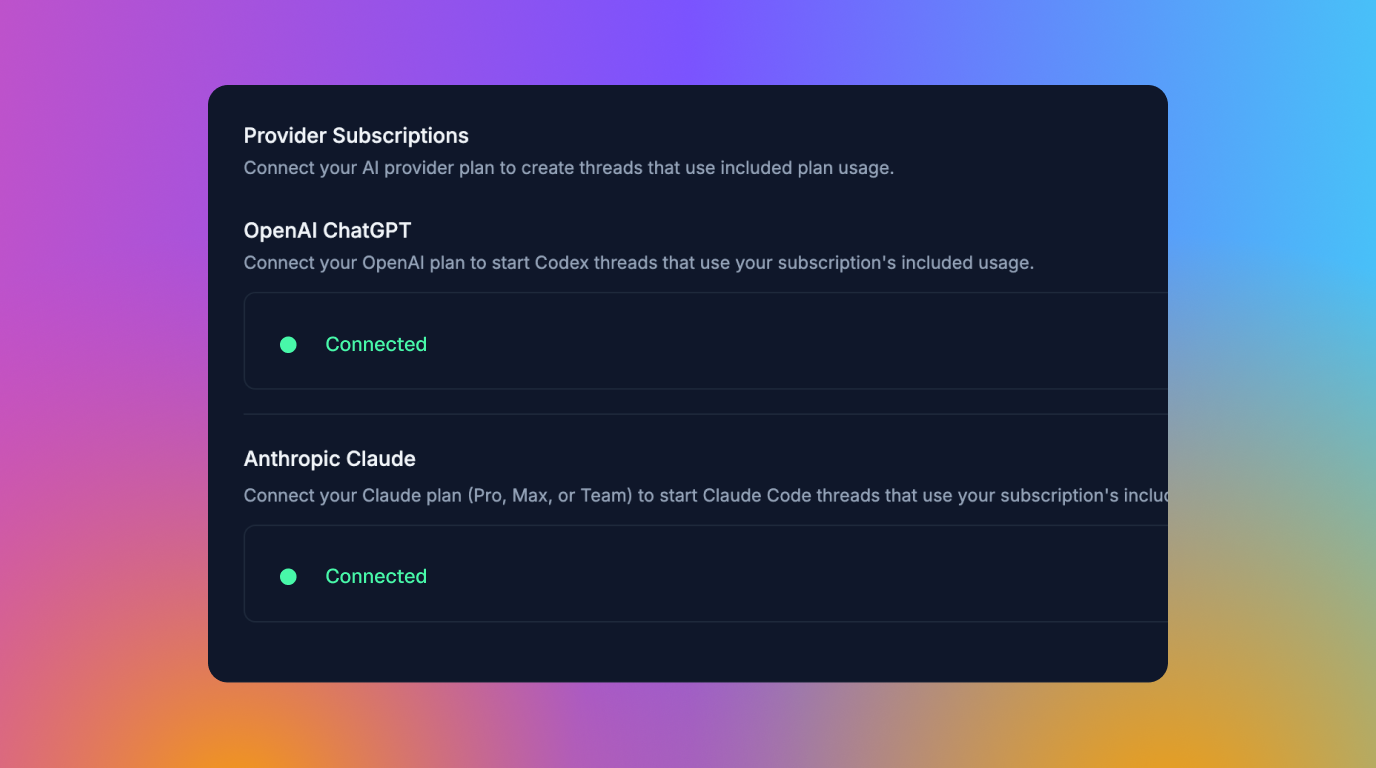
This is the big one. If you already pay for Claude Pro/Max or ChatGPT, you can now sign in to that subscription right from the Builder and have Draftbit's AI agent run on your plan — no Draftbit credits consumed. Connect your provider once from the agent settings page, where your Claude and ChatGPT subscriptions now live together under a single, unified "BYOK Subscriptions" section.
To make this genuinely useful for teams who'd rather bring their own keys, we also added new "No bundled AI Credits" options to the Standard and Pro plans at a lower base price. Pay for the platform, plug in your own model access, and skip the credit bundle entirely.
A few thoughtful touches came along with it. When you're running on your own subscription, Draftbit's identity and brand instructions step back so the underlying model can do its thing without extra noise. And when something goes wrong on your provider's side — an auth issue, a rate limit, or hitting your plan's usage cap — you now see the real provider error message naming your provider, with a link to upgrade, instead of a generic "the AI run stopped with an error." Bringing your own ChatGPT subscription is the newer of the two and still in beta, so expect it to keep improving.
Connect a Supabase Backend
Your app needs a backend, and now one of the most popular options is built right in. You can connect Supabase — database, auth, and storage — to your app from the Integrations tab or right when you create it, and it's free to use during the open beta.
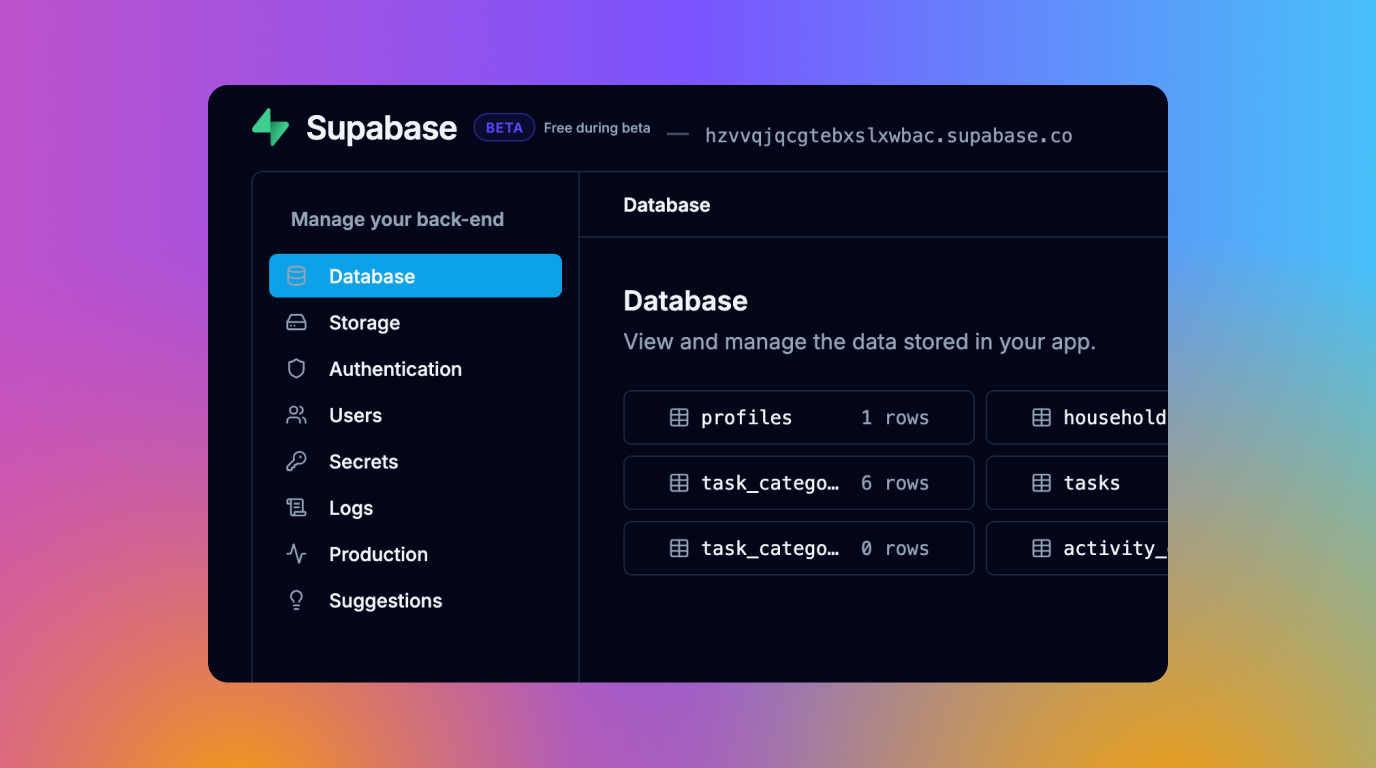
The Supabase dashboard inside Draftbit defaults to the preview branch the AI agent works in, so any tables and schema it creates show up right away, and you can switch between your preview and production branches whenever you need to. There's also a new Edge Functions tab that lists your project's functions with their status, invoke path, version, and last update. It's the fastest path yet from "I have an idea" to a real, data-backed app.
Start From a Template
Starting from a blank screen is hard. So we've made starting from a great-looking one easy. When you create a new app, you can now pick from a gallery of designed UI kits — fully built screens and components ready to wire up to your backend — each with clearer descriptions and expanded tags to help you find the right fit. Before you commit, flip through multiple screenshots of each template in an auto-advancing carousel, so you know exactly what you're starting from.
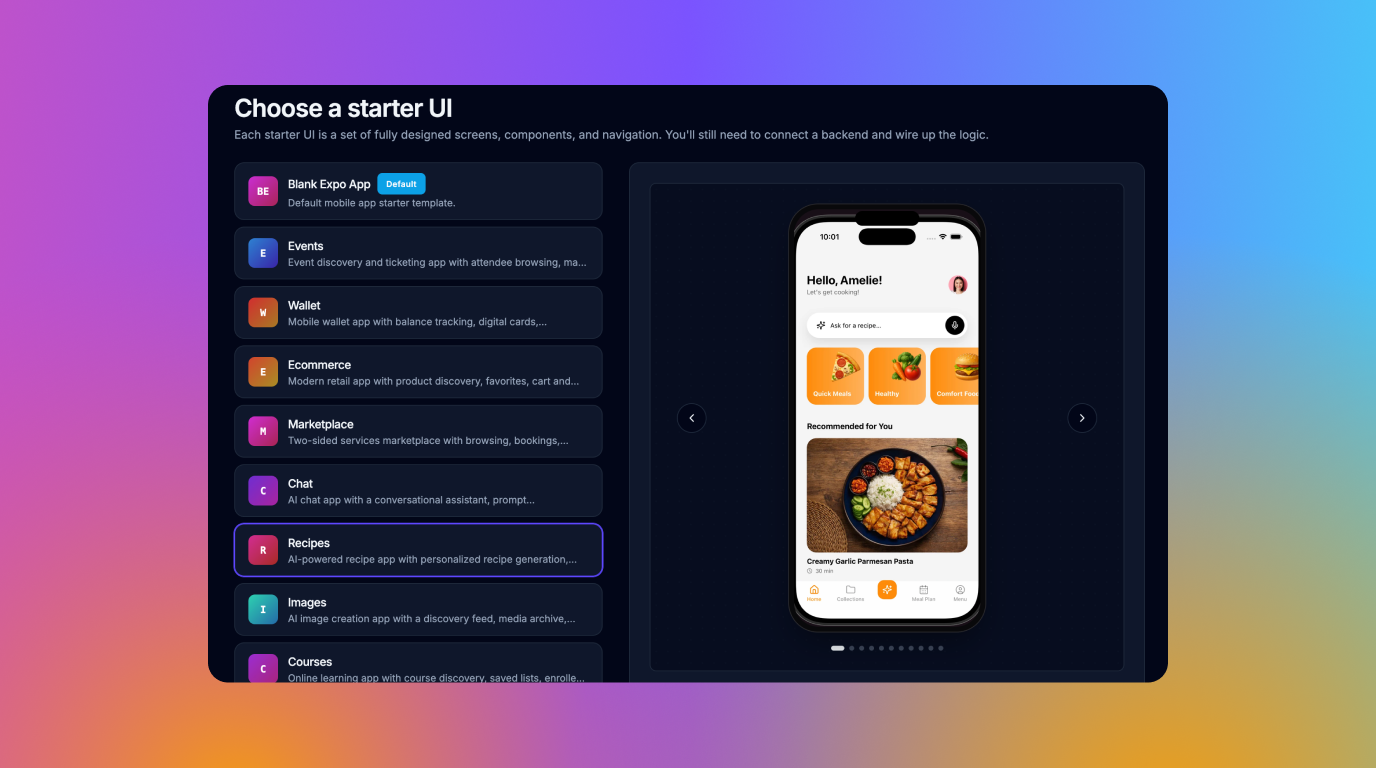
For mobile, this got even better: creating a new Expo app — whether from a prompt, the enhance step, or "Create project without AI" — now starts with a visual Starter UI picker. Choose from a dozen polished, iPhone-framed starting points, including Events, Ecommerce, Marketplace, Social, Property, Fitness, Recipe, and Chat, each with a refreshed name, description, and screenshot so you can see exactly what you're building on.
Preview on Your Phone With a QR Code
Sharing a live preview just got easier. Share pages now show a QR code that visitors can scan to open the live preview on their phone, plus a one-click Copy link button for desktop. Anyone you share with can see your app running on a real device without signing in.
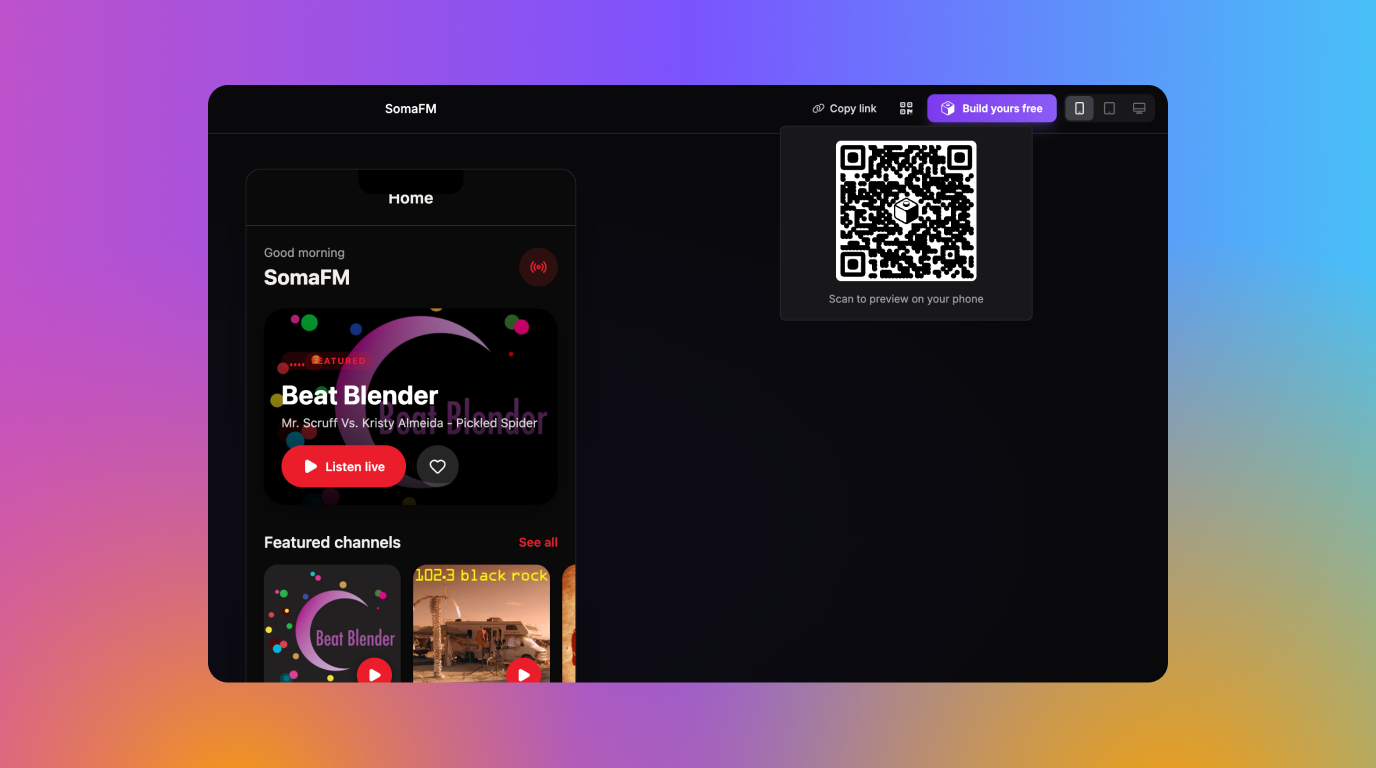
And apps created from a public prompt link can now be claimed and saved to your own account.
A Faster, Smarter Agent Chat
Two changes here make working with the agent feel a lot more fluid. First, prompt queueing is now rolled out to everyone: queue follow-up prompts while the agent is still working. Type your next instruction and it lands in an "Up next" list, running in order as the agent finishes each task — with conversation context carried across runs. You can edit, reorder, or cancel anything in the queue, and stop or resume the whole thing at any time.
Second, you can paste images and files directly into the chat composer. Drop in a screenshot, an image copied from a webpage, or a supported text, code, or document file — no more round-tripping through the file picker. It's a small thing that you'll feel every single day.
Edit Themes, Palettes & Typography — Now for v1 Apps Too
The Themes page got a major upgrade, and the biggest news is that apps imported from v1 now render right alongside v2 apps in the same surface. No more hunting through code to recolor your app.
Theme color rows now show a searchable token picker grouped by palette, with a "Use custom value" mode for those one-off hex values. There's a dedicated Palettes tab where you can edit the underlying token values directly — change a palette color once and every theme row referencing it updates instantly. Dark-mode overrides, leading-zero token names, and palettes with spaces in their names all round-trip safely.
Typography got the same treatment. The new Typography tab works for both v1 and v2 apps, and the font family picker is a searchable list of Google Fonts with live previews. Pick a font and Draftbit wires up the right Expo font name (or a CSS import for non-Expo apps) and saves it to disk for you. Each typography row even previews at its pending size, weight, and letter spacing so you can see your changes before committing.
A Refreshed Model Lineup
Your model picker keeps getting better. Claude Opus 4.8 is now available, routed via direct Anthropic and OpenRouter (1M-token context) or Azure Foundry (200k context), with prompt caching. Qwen 3.7 Max brings a top-tier option with a 1M-token context window via OpenRouter and BYOK. Gemini 3.5 Flash adds Google's fast model with a 1M-token context for larger projects. And by popular demand, Claude Haiku 4.5 is back as a fast, low-cost option.
The agent also got smarter about how it uses these models. Instead of a fixed limit, it now waits until 75% of the selected model's actual context window before compacting a conversation — so on large-context models, sessions run much longer before anything gets summarized, and the agent keeps more of your work in view.
Small But Notable
Manage your packages without a prompt
A new Packages panel lets you view, add, edit, and remove the npm dependencies in your project's package.json directly — no AI prompt required.
Upload your own fonts
Drop TTF, OTF, WOFF, and WOFF2 files into the Assets panel or attach them in an AI chat. Font files now upload cleanly and show up with a proper font icon in the asset browser.
A static preview fallback
When the live preview hits an error or fails to start, the Builder now offers an automatically-built static snapshot of your last working state — so you can keep previewing while the agent fixes the issue.
A redesigned prop config panel
Component props now get type-aware editors: text inputs for strings, number fields, toggles for booleans, and dropdowns for fixed-value props — with the option to drop into code mode whenever you need it.
More components, and the v1 icons are back
We've brought more @draftbit/ui components into the Add Components panel — media, swiper, pin input, progress, and others — each automatically pinned to the version compatible with your project's Expo SDK. We also restored the cleaner, purpose-drawn v1 icon set across the component panels, with dedicated dark and light variants.
The latest framework versions
Generated apps now build on Expo SDK 54 and React Native 0.81, and can use the latest Tailwind v4 and NativeWind v5 with all the PostCSS, Babel, and Metro config wired up automatically. Older setups continue to work unchanged.
A refreshed Hire an Expert page
Our expert services page got a full redesign with packages, monthly plans, real testimonials, and use-case cards for upgrading, migrating, or fixing vibe-coded apps. The Hire Expert tab is back in the top nav and mobile menu.
Start building the moment you land
Create, prompt, onboarding, import, and v1 migration flows now all land directly inside the Builder instead of separate setup pages, so you start chatting with the agent right away.
A calmer, cleaner Builder
The Screens, Files, and Component Tree panels now use a single + dropdown instead of a row of icons, the right-side editor/chat panel keeps a consistent width as you switch tabs, logs now open in an inline panel instead of a separate page, and the bottom of the left nav is tidied into a single "More" menu. Lots of small papercuts, gone.
The mobile builder is genuinely usable now
Several Builder screens were cramped on phones. They now use mobile-first bottom tabs to switch between the page content, the AI agent, and — on the Visual, Code, and Themes editors — the live preview, instead of squeezing a desktop layout onto a small screen. The preview also stays loaded as you switch tabs, so it no longer reloads every time.
A focused Simulator for mobile previews
Expo apps get a new Simulator tab with a single-device mobile preview — including an iOS/Android toggle, a device picker, and an orientation control — for checking exactly how your app looks on one device.
Everything build-related in one place
Environment variables, packages, and (for v1 imports) legacy global variables now live together on a dedicated Build Config page, instead of being tucked inside Publishing.
Git history and publishes load instantly
The Builder no longer loads your entire commit history or every publish up front. Git History and the Publishing Activity and Simulators tabs now page in with a "Load more" button, so they open fast even with thousands of entries — and you can page further back for rollbacks than before.
Bring your own Android signing keystore
When publishing to Android, you can now upload and reuse your own signing keystore, so apps already on the Play Store keep their existing key instead of resetting it. Publishing also tells you which step failed — the build or the store submission — and build logs are cleaner, with iOS (Xcode) errors and warnings standing out clearly.
Welcome credits last a full year — and more ways to earn them
Signup credits used to expire after 7 days; they now stay usable for a full year, applied retroactively to existing grants. You can also earn more credits by leaving a review on sites like G2, Capterra, and Trustpilot, reviewing the Draftbit Preview app, or mentioning Draftbit in the community.
Delete your account yourself
Account settings now include a self-serve deletion flow that cancels owned subscriptions at period end and removes your owned orgs and apps after a 72-hour delay. The same email can sign up fresh later.
More reliable previews
We squashed a class of blank/white-screen previews that could appear even when the sandbox looked healthy, made stuck previews easier to recover with a highlighted restart control, and stopped prewarmed apps from hanging on "Installing dependencies…". Native preview and publishing also no longer overwrite custom iOS bundle IDs or Android package names you've set.
Tighter security around exports
GitHub export now only accepts github.com URLs, and generated .env files are kept out of your Git history — closing a couple of paths where tokens or secrets could leak.
That's a wrap for this round — thanks for building with us, and as always, keep the feedback coming. Happy building! 🚀

Build your app with Draftbit
Start free and build with AI in your browser.