

Product update
Opus 4.6, Tons of improvements, and Building From Your Couch 🛋️
 Brian Luerssen
Hey Everyone! We've been hard at work on some new features and improvements to the Draftbit builder. Here's what's new:
New Models & Smarter Selection
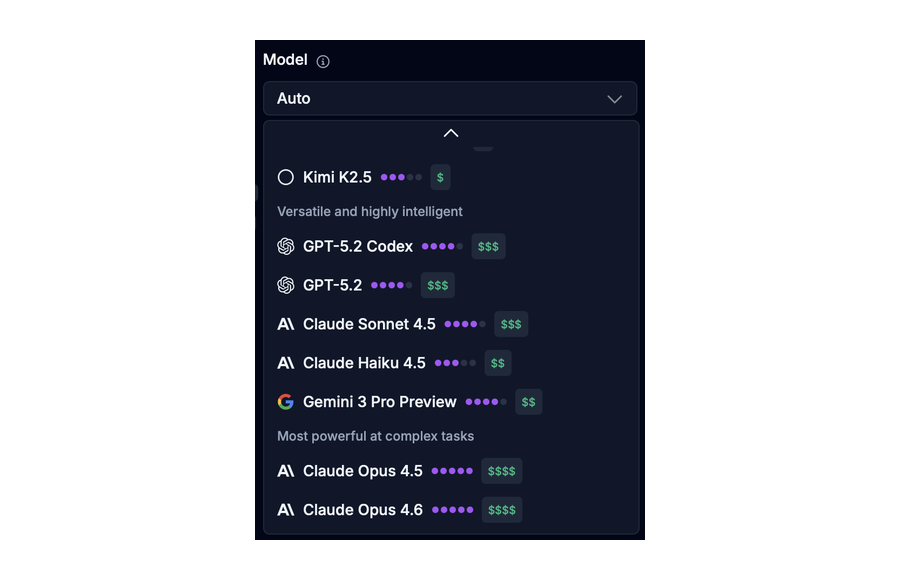
We've added Claude Opus 4.6, Anthropic's latest and most capable model, to Draftbit. Opus 4.6 brings improved reasoning, better code generation, and more nuanced understanding of complex app requirements. Whether you're building intricate data flows or refining UI details, this model delivers noticeably better results.
But that's not all: we've also expanded support for additional models and providers, giving you more flexibility to choose the right tool for your task, including those from xAI, DeepSeek, and Moon that are lower cost and higher quality. With Draftbit, you can now use all of the major providers and models in one place.
Unified Model Selector
Finding and switching between models is now much easier with our new unified model selector. Instead of navigating through separate agent and model dropdowns, you can now browse models first and see which agents support them. This "model-first" approach makes it faster to find exactly what you need, especially when you want to try out a specific model like Opus 4.6 or compare results across different providers.
Mobile Responsive Builder
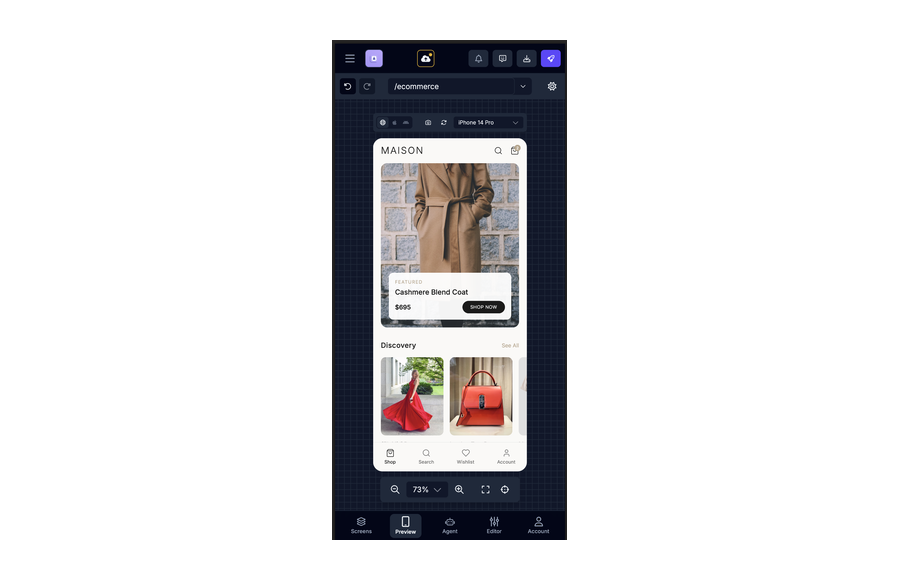
We know not everyone is at their desk when inspiration strikes. The Draftbit builder is now fully responsive on mobile devices, so you can review your apps, check on builds, or even make quick edits from your phone or tablet. While we still recommend a larger screen for deep building sessions, having mobile access means you're never stuck waiting to get back to your computer.
Better Thread Summaries & Message Copying
Working with long threads just got easier. We've improved how thread summaries are generated, making them more accurate and useful for quickly understanding what happened in a conversation. You can also now easily copy messages from your threads—perfect for sharing context with teammates, documenting your progress, or referencing AI suggestions in other tools.
Full Billing Plans Are Here
We've rolled out our complete billing system with plans designed for individuals, teams, and growing organizations. Each plan comes with a monthly credit allocation, and you can see exactly what you're getting before you commit. Whether you're just getting started or scaling up a production app, there's a plan that fits.
Key improvements include:
- Team Plans – Collaborate with your team under a single billing account with shared credits and unified management
- Annual billing options – Save with yearly subscriptions and get better visibility into your credit usage over time
- Clearer plan comparisons – Easily see what's included at each tier so you can make the right choice
Discounts on Credit Top-Up Bundles
Need more credits? We've introduced discounted credit bundles so you can top up without breaking the bank. The more credits you purchase at once, the better the value. This is especially useful for teams with variable usage or anyone working on a big project push.
Improved Credit Awareness & Refill Timing
Understanding your credit balance shouldn't require a calculator. We've added a smart credit reset countdown that shows you exactly when your credits will refill—whether that's in hours, days, or at a specific time. You'll also see clearer indicators when you're running low, so you can plan ahead and never get caught off guard mid-conversation.
The billing page now provides better context around:
- Your current credit balance and usage
- When your next credit allocation arrives
- How your usage compares to your plan limits
Conditional Components in the Component Tree
Building dynamic UIs just got more powerful. You can now see conditional operators like &&, ||, and ?? directly in your component tree.
Better Visual Styling in the Styles Panel
The styles panel has received a visual refresh to make it easier to work with. We've added an opacity slider for fine-tuned control over element transparency, and improved how style values are displayed so you can see at a glance what's applied. These refinements make the styling experience feel more polished and intuitive, especially when you're tweaking designs to get them just right.
That's what's new this week! As always, we're listening to your feedback and working on making Draftbit better every day. If you have questions or ideas, drop us a line—we'd love to hear from you.
Happy building! 🚀

Build your app with Draftbit
Start free and build with AI in your browser.