

Product update
Smarter Code Editor, Faster Startup + more!
 Dave Sebek
Hey there! We've been laser-focused on crushing bugs and making meaningful improvements to your experience since the last update, and there's a lot to share. Across eight releases (v0.2.7 through v0.2.16), we've made the builder meaningfully faster, smarter, and more pleasant to use day-to-day — whether you're building on a big monitor or squeezing in a session from your phone.
TL;DR: The code editor now has full TypeScript autocomplete and hover types. Theme color pickers finally pull from your actual theme files. And sandbox startup is dramatically faster thanks to a prewarming system we've been quietly building in the background.
Import Publishing Credentials from v1
If you published an app with Draftbit v1 and migrated to v2, you may have run into frustrating authentication failures when trying to publish — wrong signing keys, invalid credentials, the works. We've fixed the root cause. v2 can now import your publishing credentials from v1, so you don't have to re-enter signing keys or recreate certificates that already exist.
Under the hood, this involved making sure app metadata — version numbers, bundle IDs — travels correctly during import. Apple Bundle ID validation is also now more flexible, catching fewer false positives that were blocking valid IDs.
Code Editor: Autocomplete and Hover Types
The code editor just got a lot smarter. We've integrated tsserver — the same language server that powers VS Code's TypeScript support — so you now get real autocomplete, hover type information, and inline linting as you type. If you're working with components, props, or any typed interfaces in your app, the editor will now tell you what's available and what a function expects, right in context.
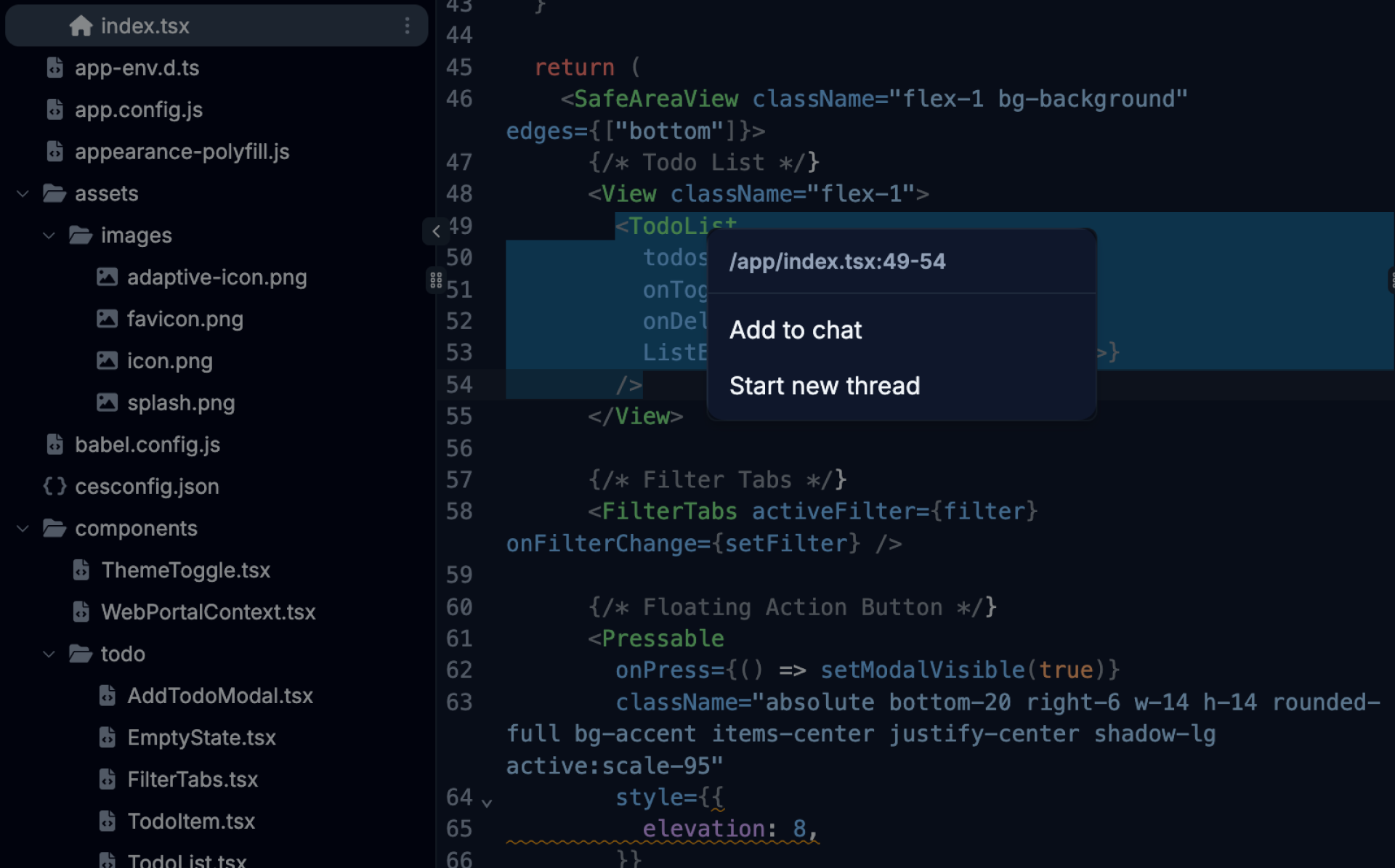
We also added a small but handy workflow improvement: you can now add lines of code from the editor to the AI chat as references. Instead of describing what you want changed ("that function on line 47"), you can select the code in Code view then right-click and choose to add the reference to the current thread or start a new one. The AI knows exactly what you're pointing at.
Theme Color Pickers That Actually Know Your Theme
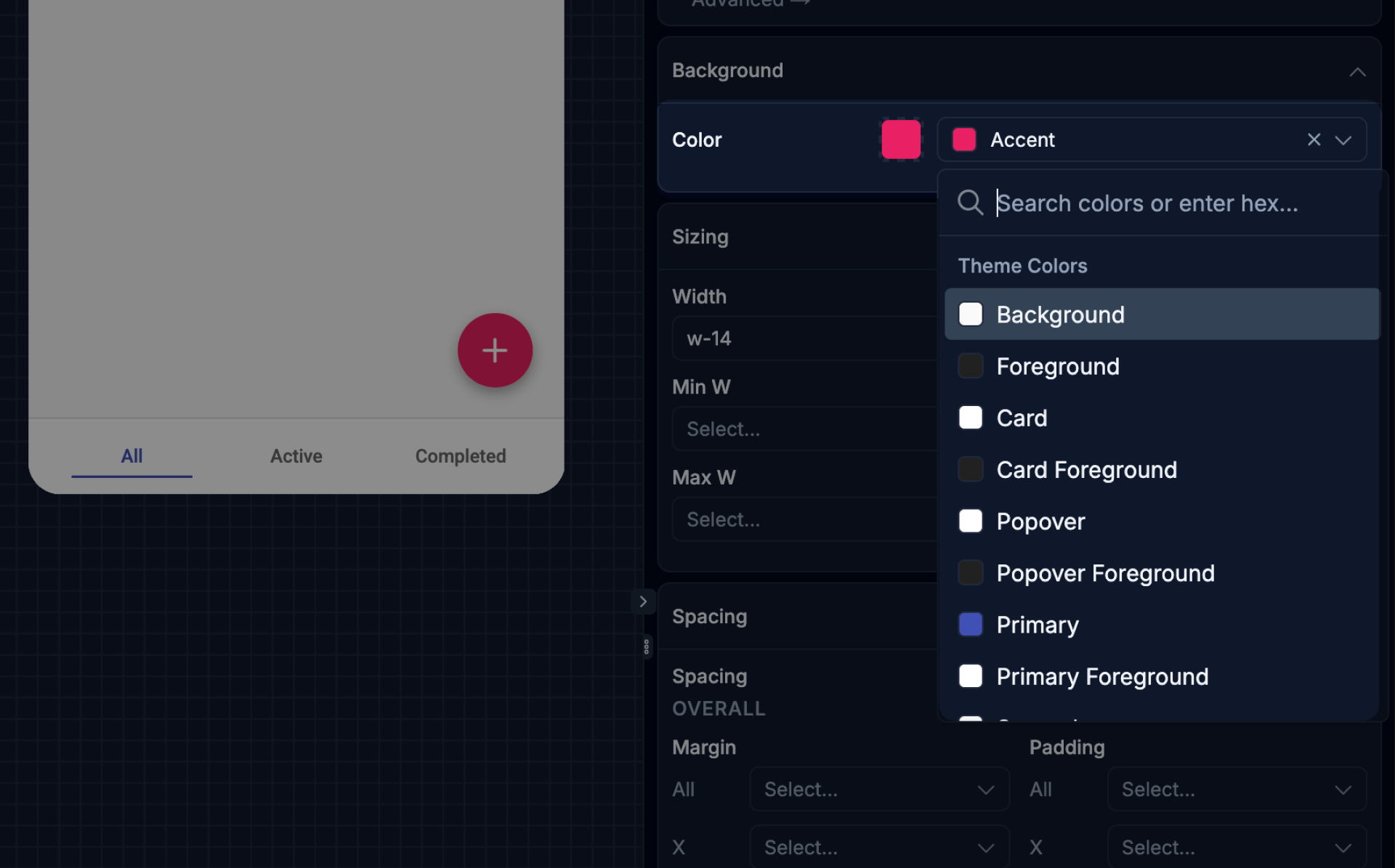
Color pickers in the Styles panel now read from your app's actual theme files — both light and dark variants — instead of a generic palette. You'll see your real theme colors as swatches, with search so you can find the right token quickly. If for some reason the theme data can't be loaded, there's a graceful fallback so you're never stuck.
This also fixes a long-standing inconsistency where the color picker UI wouldn't reflect changes you'd made to the theme through code. The picker now stays in sync with your theme files, so what you see in the Styles panel matches what's actually in your app.
AI Assistant Panel: Resizable, Dockable, and More Accessible
The AI Assistant panel has gotten a polish pass. It's now more easily resizable — drag it to the width that works for your screen — and it can toggle between docked mode (anchored to the side of the builder) and overlay mode (floating over the canvas). This applies to the App Configuration, Publishing, and Agent Customization pages, where the panel previously felt a bit bolted-on.
"Ask user" questions — where the agent needs input from you before proceeding — now appear above the chat input instead of inline with the conversation. That means they stay visible and easy to answer even when there's a long message thread above them.
Faster App Startup
Creating a new app or spinning up a sandbox is now noticeably faster. We built a prewarming system that keeps a pool of initialized sandbox instances ready to go, so when you hit "Create," you're not waiting for a cold start. App name generation is also significantly faster, and we fixed issues that were intermittently blocking name and icon generation from completing at all.
Small But Notable
Consistent panel sizing across the builder
The right-hand panel now has a consistent size (25% by default, adjustable between 20–40%) across Visual Editor, Code Editor, Logs, Themes, Config, and Agents pages. Jumping between sections no longer causes the panel to snap to unexpected widths.
Code-preview linking in the editor
Hovering over a component in the preview now highlights the matching code in the editor. It's a small thing, but if you're debugging layout and trying to find where a specific element lives in code, it removes a lot of hunting.
Versioned build logs
Build logs now label older runs as "outdated" so you can immediately distinguish the current build's output from a previous run. If you've ever stared at a log wondering "is this from the build I just kicked off?", this one's for you.
Billing fixes
One-time credit top-ups now require an active paid subscription — free users will see a clear message and an upgrade link instead of a confusing dead end. We also fixed a billing calculation issue that could result in undercharges, and legacy plan pricing now displays correctly in the billing overview.
Reliability improvements
Fixed HTTP 431 errors that could occur when viewing large chat threads. The page now auto-reloads on "Failed to load chunk" errors so you can recover without a manual refresh. Version update notifications no longer fire too frequently. And agent image uploads are now always converted to PNG before processing, which eliminates a class of image-handling errors.
That's everything from the past few weeks. We're moving fast — more to come soon. Happy building!

Build your app with Draftbit
Start free and build with AI in your browser.