

Product update
Opus 4.7, Web Apps in Beta + more!
 Dave Sebek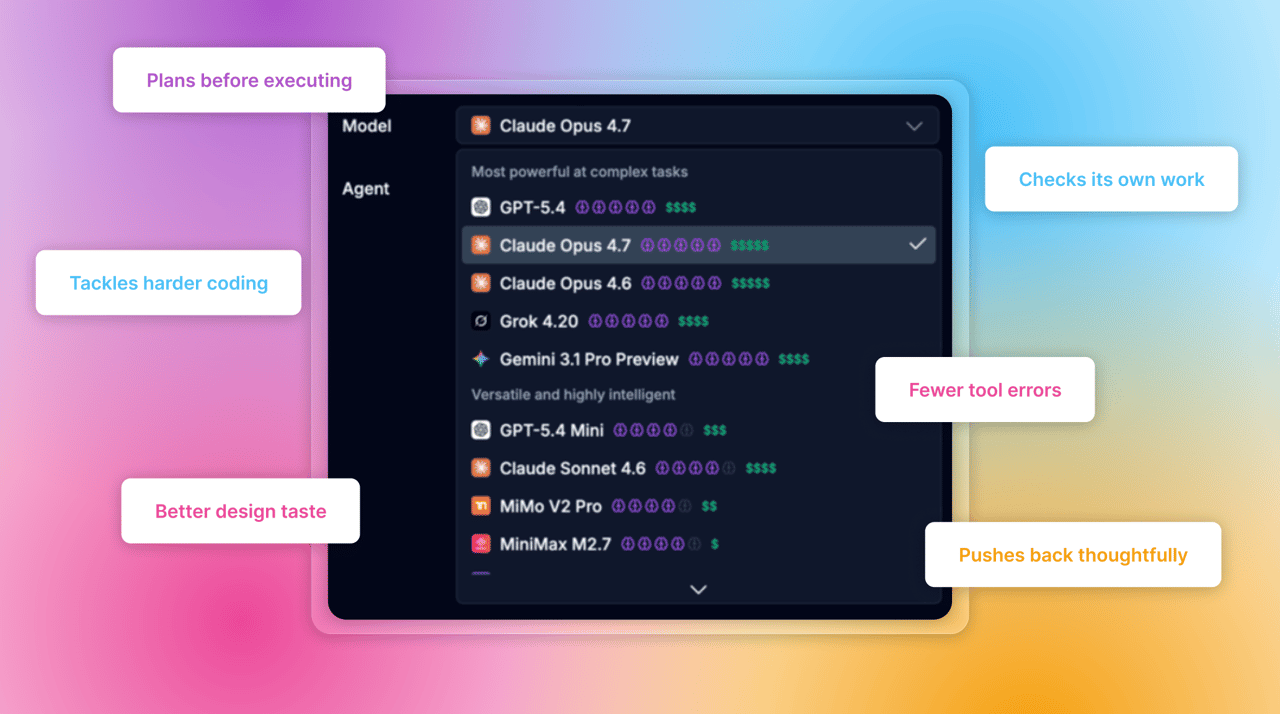
Hey everyone! It's been a busy couple of weeks since our last update, with a new flagship model, the start of the web app era for Draftbit, and a long list of quality-of-life improvements across the builder, editor, and AI assistant.
TL;DR: Claude Opus 4.7 is now available and brings noticeable gains in multi-step reasoning and tool use. Web Apps in Beta ships on a brand-new stack — React 19, Vite 6, Tailwind CSS v4, React Router v7, and shadcn/ui — giving you a modern foundation for shipping web apps alongside your mobile builds. And across the product, we've polished the agent and model selectors, made the preview server more resilient, tightened up publishing, and fixed a bunch of sharp edges.
Claude Opus 4.7
Anthropic's newest flagship model, Claude Opus 4.7, is now available in Draftbit. Building on Opus 4.6, this release brings improvements where you actually feel them: sharper multi-step reasoning, more reliable tool use inside the sandbox, and better judgment about when to ask for approval versus keep going on its own.
In our own testing, Opus 4.7 is noticeably better at holding context across long sessions, picking up on subtle patterns in your codebase, and planning out larger, multi-file changes before it starts editing. If you were getting good results with 4.6 on complex tasks, expect 4.7 to take them a step further — with fewer hand-holds and less back-and-forth.
You can pick Opus 4.7 from the model selector in any chat on our Pro plan and above.
A quick heads-up: Opus 4.7 is a premium model and consumes credits faster than most other options. It's the right pick for complex, multi-step work where the extra horsepower pays off — for lighter tasks, you'll usually get more mileage out of Sonnet or one of the smaller models.
One strategy we've seen work really well: use Opus to plan the work, then switch to a cheaper model like Sonnet to execute it. Opus is excellent at breaking down a fuzzy request into a clear, step-by-step plan and spotting the tricky parts up front. Once the plan is solid, Sonnet can usually carry out the actual edits just as well for a fraction of the credits. Switching models mid-thread is one-click.
Web Apps in Beta
This is a big one: Draftbit now supports building web apps in beta, alongside our existing mobile support.
Instead of the React Native + Expo stack we use for mobile apps, web apps ship on a fresh, modern stack purpose-built for the web:
- React 19
- Vite 6
- TypeScript (strict mode)
- Tailwind CSS v4 for styling
- React Router v7 with file-based routing for navigation
- shadcn/ui for UI components
That means you can use the same AI-assisted building experience you love for mobile to ship marketing sites, dashboards, admin tools, internal apps — anything web-based — with the latest and greatest in the React ecosystem under the hood.
Since web apps are brand-new to Draftbit, we've been actively polishing the experience as we go. In this wave of releases: published web apps now generate a sitemap and robots.txt and prerender static pages where possible so search engines can actually index your site; web app previews default to a desktop-sized canvas (while mobile apps still default to a phone preview); and the preview iframe is more reliable on first load, cutting down on blank or crashy preview states.
This is still beta, so expect things to keep evolving quickly — but we're excited to get it into your hands.
Small But Notable
A polished agent and model selector
The agent and model selectors in the prompt input and chat bar got a new dropdown design that's consistent across the dashboard and builder. The model list now filters to only show models compatible with the selected agent, and in threads where the agent is locked, it renders as a chip with a tooltip explaining why. Switching models on an existing thread is also handled more gracefully — if the selected model isn't compatible, you'll see a one-click option to start a new thread with it instead of a confusing warning.
Better AI error handling
When an AI provider request fails — rate limits, auth errors, unavailable models — you'll now see a friendly inline error in the chat, and your unsent message text gets restored so you don't lose work. Long conversations also show a clearer message when a prompt exceeds the selected model's context window, instead of surfacing a raw provider error. And Codex users can now see reasoning summaries inline as the model works through your request.
Sensitive action approvals are back
We've restored the agent's habit of asking for your approval before performing sensitive or irreversible actions in the sandbox — publishing, destructive changes, or connecting external services. No more surprise side effects.
A more resilient preview server
The preview server no longer auto-restarts when it hits non-fatal errors. Instead, it shows a "running (with errors)" status so your preview stays live, and you can trigger a manual restart from the preview toolbar whenever you want.
Components panel improvements
You can drag components into your app more flexibly, click outside the panel to dismiss it, and for app-based components you can now jump straight to the source file. Billing-gated features now open upgrade prompts in context instead of relying on awkward overlays.
A snappier editor
We moved in-editor ESLint work out of the typing path (while keeping save-time checks in place), so the code editor should feel faster day-to-day. Git change indicators are now simplified to small colored dots, making it easier to scan file state at a glance. And you can now view hidden files — including .github — for easier access to advanced project files that were previously out of reach.
More reliable publishing
Fixed a nested-lock error that could stop web publishes while Draftbit committed config changes. Publish rollbacks now complete more reliably without leaving your working state out of sync. And recent preview builds and standard publishes are sorted together correctly, making recent activity easier to scan.
Asset fixes
Renaming or moving assets with spaces, unicode, or other special characters no longer fails with an invalid-character error. We've also made project syncs more resilient to brief network hiccups, so you'll see fewer random errors on flaky connections.
Cleaner free plan experience
Free plan users are now locked to the Codex agent and GPT-5.4 Mini model, with a cleaner locked state on the selectors and an in-context upgrade modal that opens consistently across the new thread panel, the active thread header, and the prompt toolbar. When credits run out mid-run, you'll see a clear "Your credits have been depleted" message instead of a raw API response — and it always renders as a top-level message now, not sometimes buried inside a reasoning block. Free plan users also get GPT-5.4 during initial app creation for a stronger starting point, and upgrade emails when they hit key credit milestones.
Small fixes worth calling out
AI-generated app names are now capped at 2 words and 30 characters, and long app names truncate with an ellipsis in the app card. The agent completion notification sound no longer replays every time you switch navigation tabs. Exported project zips no longer appear empty when opened on Windows. Live preview deep links now include the Expo version so we can warn about version mismatches before the app opens. And website sign-up flows now pass an explicit redirect so new users reliably land in the builder after creating an account.
Coming Soon
Agent planning & project management
We're making the agent much better at planning work up front. During the create-app flow, the agent will break your idea down into tasks on a task board and then execute against that plan — so you can see what it's going to do before it starts, and track progress as it goes. Alongside that, we're adding a dedicated project management view where you can manage and assign tasks across your teammates and AI agents, all in one place.
Supabase backend, built in
Soon you'll be able to spin up and connect your app to a Supabase backend — database, APIs, cloud functions, realtime, and more — directly from inside the builder. As part of the setup, we'll pre-configure the Supabase MCP connector for you, so your agent is wired up and ready to start building your backend as soon as the project is created.
More on web apps
Web apps are still in beta, and we have a lot more coming — expanded component coverage, deeper routing tools, and tighter feedback loops between preview and publish. If you try it and have thoughts, please send them our way.
That's all for now — happy building!

Build your app with Draftbit
Start free and build with AI in your browser.